Qt 名稱空間包含整個 Qt 庫所用的雜項標識符。 更多...
| 頭: | #include <Qt> |
| flags | Alignment |
| enum | AlignmentFlag { AlignLeft, AlignRight, AlignHCenter, AlignJustify, ..., AlignVertical_Mask } |
| enum | AnchorAttribute { AnchorName, AnchorHref } |
| enum | AnchorPoint { AnchorLeft, AnchorHorizontalCenter, AnchorRight, AnchorTop, AnchorVerticalCenter, AnchorBottom } |
| enum | ApplicationAttribute { AA_ImmediateWidgetCreation, AA_MSWindowsUseDirect3DByDefault, AA_DontShowIconsInMenus, AA_NativeWindows, ..., AA_CaptureMultimediaKeys } |
| enum | ArrowType { NoArrow, UpArrow, DownArrow, LeftArrow, RightArrow } |
| enum | AspectRatioMode { IgnoreAspectRatio, KeepAspectRatio, KeepAspectRatioByExpanding } |
| enum | Axis { XAxis, YAxis, ZAxis } |
| enum | BGMode { TransparentMode, OpaqueMode } |
| enum | BrushStyle { NoBrush, SolidPattern, Dense1Pattern, Dense2Pattern, ..., TexturePattern } |
| enum | CaseSensitivity { CaseInsensitive, CaseSensitive } |
| enum | CheckState { Unchecked, PartiallyChecked, Checked } |
| enum | ClipOperation { NoClip, ReplaceClip, IntersectClip, UniteClip } |
| enum | ConnectionType { AutoConnection, DirectConnection, QueuedConnection, BlockingQueuedConnection, UniqueConnection, AutoCompatConnection } |
| enum | ContextMenuPolicy { NoContextMenu, PreventContextMenu, DefaultContextMenu, ActionsContextMenu, CustomContextMenu } |
| enum | CoordinateSystem { DeviceCoordinates, LogicalCoordinates } |
| enum | Corner { TopLeftCorner, TopRightCorner, BottomLeftCorner, BottomRightCorner } |
| enum | CursorMoveStyle { LogicalMoveStyle, VisualMoveStyle } |
| enum | CursorShape { ArrowCursor, UpArrowCursor, CrossCursor, WaitCursor, ..., BitmapCursor } |
| enum | DateFormat { TextDate, ISODate, SystemLocaleShortDate, SystemLocaleLongDate, ..., LocalDate } |
| enum | DayOfWeek { Monday, Tuesday, Wednesday, Thursday, ..., Sunday } |
| enum | DockWidgetArea { LeftDockWidgetArea, RightDockWidgetArea, TopDockWidgetArea, BottomDockWidgetArea, AllDockWidgetAreas, NoDockWidgetArea } |
| flags | DockWidgetAreas |
| enum | DropAction { CopyAction, MoveAction, LinkAction, ActionMask, IgnoreAction, TargetMoveAction } |
| flags | DropActions |
| enum | EventPriority { HighEventPriority, NormalEventPriority, LowEventPriority } |
| enum | FillRule { OddEvenFill, WindingFill } |
| enum | FocusPolicy { TabFocus, ClickFocus, StrongFocus, WheelFocus, NoFocus } |
| enum | FocusReason { MouseFocusReason, TabFocusReason, BacktabFocusReason, ActiveWindowFocusReason, ..., OtherFocusReason } |
| enum | GestureFlag { DontStartGestureOnChildren, ReceivePartialGestures, IgnoredGesturesPropagateToParent } |
| flags | GestureFlags |
| enum | GestureState { GestureStarted, GestureUpdated, GestureFinished, GestureCanceled } |
| enum | GestureType { TapGesture, TapAndHoldGesture, PanGesture, PinchGesture, SwipeGesture, CustomGesture } |
| enum | GlobalColor { white, black, red, darkRed, ..., color1 } |
| typedef | HANDLE |
| enum | HitTestAccuracy { ExactHit, FuzzyHit } |
| enum | ImageConversionFlag { AutoColor, ColorOnly, MonoOnly, DiffuseDither, ..., NoOpaqueDetection } |
| flags | ImageConversionFlags |
| enum | InputMethodHint { ImhNone, ImhHiddenText, ImhNoAutoUppercase, ImhPreferNumbers, ..., ImhExclusiveInputMask } |
| flags | InputMethodHints |
| enum | InputMethodQuery { ImMicroFocus, ImFont, ImCursorPosition, ImSurroundingText, ..., ImAnchorPosition } |
| enum | ItemDataRole { DisplayRole, DecorationRole, EditRole, ToolTipRole, ..., UserRole } |
| enum | ItemFlag { NoItemFlags, ItemIsSelectable, ItemIsEditable, ItemIsDragEnabled, ..., ItemIsTristate } |
| flags | ItemFlags |
| enum | ItemSelectionMode { ContainsItemShape, IntersectsItemShape, ContainsItemBoundingRect, IntersectsItemBoundingRect } |
| enum | Key { Key_Escape, Key_Tab, Key_Backtab, Key_Backspace, ..., Key_Cancel } |
| enum | KeyboardModifier { NoModifier, ShiftModifier, ControlModifier, AltModifier, ..., GroupSwitchModifier } |
| flags | KeyboardModifiers |
| enum | LayoutDirection { LeftToRight, RightToLeft, LayoutDirectionAuto } |
| enum | MaskMode { MaskInColor, MaskOutColor } |
| enum | MatchFlag { MatchExactly, MatchFixedString, MatchContains, MatchStartsWith, ..., MatchRecursive } |
| flags | MatchFlags |
| enum | Modifier { SHIFT, META, CTRL, ALT, UNICODE_ACCEL } |
| enum | MouseButton { NoButton, LeftButton, RightButton, MidButton, ..., XButton2 } |
| flags | MouseButtons |
| enum | NavigationMode { NavigationModeNone, NavigationModeKeypadTabOrder, NavigationModeKeypadDirectional, NavigationModeCursorAuto, NavigationModeCursorForceVisible } |
| enum | Orientation { Horizontal, Vertical } |
| flags | Orientations |
| enum | PenCapStyle { FlatCap, SquareCap, RoundCap } |
| enum | PenJoinStyle { MiterJoin, BevelJoin, RoundJoin, SvgMiterJoin } |
| enum | PenStyle { NoPen, SolidLine, DashLine, DotLine, ..., CustomDashLine } |
| enum | ScrollBarPolicy { ScrollBarAsNeeded, ScrollBarAlwaysOff, ScrollBarAlwaysOn } |
| enum | ShortcutContext { WidgetShortcut, WidgetWithChildrenShortcut, WindowShortcut, ApplicationShortcut } |
| enum | SizeHint { MinimumSize, PreferredSize, MaximumSize, MinimumDescent } |
| enum | SizeMode { AbsoluteSize, RelativeSize } |
| enum | SortOrder { AscendingOrder, DescendingOrder } |
| enum | TextElideMode { ElideLeft, ElideRight, ElideMiddle, ElideNone } |
| enum | TextFlag { TextSingleLine, TextDontClip, TextExpandTabs, TextShowMnemonic, ..., TextJustificationForced } |
| enum | TextFormat { PlainText, RichText, AutoText, LogText } |
| enum | TextInteractionFlag { NoTextInteraction, TextSelectableByMouse, TextSelectableByKeyboard, LinksAccessibleByMouse, ..., TextBrowserInteraction } |
| flags | TextInteractionFlags |
| enum | TileRule { StretchTile, RepeatTile, RoundTile } |
| enum | TimeSpec { LocalTime, UTC, OffsetFromUTC } |
| enum | ToolBarArea { LeftToolBarArea, RightToolBarArea, TopToolBarArea, BottomToolBarArea, AllToolBarAreas, NoToolBarArea } |
| flags | ToolBarAreas |
| enum | ToolButtonStyle { ToolButtonIconOnly, ToolButtonTextOnly, ToolButtonTextBesideIcon, ToolButtonTextUnderIcon, ToolButtonFollowStyle } |
| enum | TouchPointState { TouchPointPressed, TouchPointMoved, TouchPointStationary, TouchPointReleased } |
| flags | TouchPointStates |
| enum | TransformationMode { FastTransformation, SmoothTransformation } |
| enum | UIEffect { UI_AnimateMenu, UI_FadeMenu, UI_AnimateCombo, UI_AnimateTooltip, UI_FadeTooltip, UI_AnimateToolBox } |
| typedef | WFlags |
| enum | WhiteSpaceMode { WhiteSpaceNormal, WhiteSpacePre, WhiteSpaceNoWrap } |
| enum | WidgetAttribute { WA_AcceptDrops, WA_AlwaysShowToolTips, WA_ContentsPropagated, WA_CustomWhatsThis, ..., WA_MacNoShadow } |
| flags | WindowFlags |
| enum | WindowFrameSection { NoSection, LeftSection, TopLeftSection, TopSection, ..., TitleBarArea } |
| enum | WindowModality { NonModal, WindowModal, ApplicationModal } |
| enum | WindowState { WindowNoState, WindowMinimized, WindowMaximized, WindowFullScreen, WindowActive } |
| flags | WindowStates |
| enum | WindowType { Widget, Window, Dialog, Sheet, ..., WMacNoSheet } |
| QString | convertFromPlainText (const QString & plain , WhiteSpaceMode mode = WhiteSpacePre) |
| QString | escape (const QString & plain ) |
| bool | mightBeRichText (const QString & text ) |
Qt 名稱空間包含整個 Qt 庫所用的雜項標識符。
此枚舉類型用於描述對齊。它包含可以組閤以産生要求效果的水平標誌和垂直標誌。
The TextElideMode 枚舉還可以用於在許多狀況下以微調對齊文本外觀。
水平標誌:
| 常量 | 值 | 描述 |
|---|---|---|
Qt::AlignLeft
|
0x0001
|
與左邊緣對齊。 |
Qt::AlignRight
|
0x0002
|
與右邊緣對齊。 |
Qt::AlignHCenter
|
0x0004
|
在可用空間水平居中。 |
Qt::AlignJustify
|
0x0008
|
在可用空間兩端對齊文本。 |
垂直標誌:
| 常量 | 值 | 描述 |
|---|---|---|
Qt::AlignTop
|
0x0020
|
與頂部對齊。 |
Qt::AlignBottom
|
0x0040
|
與底部對齊。 |
Qt::AlignVCenter
|
0x0080
|
在可用空間垂直居中。 |
每次隻可使用一水平標誌。有一個二維標誌:
| 常量 | 值 | 描述 |
|---|---|---|
Qt::AlignCenter
|
AlignVCenter | AlignHCenter
|
在兩個維度上居中。 |
每次最多可以使用一個水平標誌和一個垂直標誌。Qt::AlignCenter 算作水平和垂直兩者。
3 枚舉值在可以從右到左模式下運行的應用程序中很有用:
| 常量 | 值 | 描述 |
|---|---|---|
Qt::AlignAbsolute
|
0x0010
|
若 Widget 的布局方嚮是 Qt::RightToLeft (而不是 Qt::LeftToRight ,默認),Qt::AlignLeft 參照 right 邊緣和 Qt::AlignRight 到 left 邊緣。這通常是期望行為。若想要 Qt::AlignLeft 始終意味著 left 而 Qt::AlignRight 始終意味著 right,組閤標誌與 Qt::AlignAbsolute。 |
Qt::AlignLeading
|
AlignLeft
|
同義詞 Qt::AlignLeft。 |
Qt::AlignTrailing
|
AlignRight
|
同義詞 Qt::AlignRight。 |
掩碼:
| 常量 | 值 |
|---|---|
Qt::AlignHorizontal_Mask
|
AlignLeft | AlignRight | AlignHCenter | AlignJustify | AlignAbsolute
|
Qt::AlignVertical_Mask
|
AlignTop | AlignBottom | AlignVCenter
|
標誌的衝突組閤擁有未定義含義。
Alignment 類型是 typedef 對於 QFlags <AlignmentFlag>。它存儲 AlignmentFlag 值的 OR (或) 組閤。
An anchor has one or more of the following attributes:
| 常量 | 值 | 描述 |
|---|---|---|
Qt::AnchorName
|
0
|
the name attribute of the anchor. This attribute is used when scrolling to an anchor in the document. |
Qt::AnchorHref
|
1
|
the href attribute of the anchor. This attribute is used when a link is clicked to determine what content to load. |
指定可以錨定的布局項側。這用於 QGraphicsAnchorLayout .
| 常量 | 值 | 描述 |
|---|---|---|
Qt::AnchorLeft
|
0
|
布局項的左側。 |
Qt::AnchorHorizontalCenter
|
1
|
在布局項左側和右側之間的居中 "虛擬" 側。 |
Qt::AnchorRight
|
2
|
布局項的右側。 |
Qt::AnchorTop
|
3
|
布局項的頂側。 |
Qt::AnchorVerticalCenter
|
4
|
在布局項頂部和底部之間的居中 "虛擬" 側。 |
Qt::AnchorBottom
|
5
|
布局項的底側。 |
另請參閱 QGraphicsAnchorLayout .
此枚舉描述改變應用程序範圍特徵行為的屬性。這些的啓用和禁用是使用 QCoreApplication::setAttribute (),且可以被測試采用 QCoreApplication::testAttribute ().
| 常量 | 值 | 描述 |
|---|---|---|
Qt::AA_ImmediateWidgetCreation
|
0
|
Ensures that widgets are created as soon as they are constructed. By default, resources for widgets are allocated on demand to improve efficiency and minimize resource usage. Setting or clearing this attribute affects widgets constructed after the change. Setting it tells Qt to create toplevel windows immediately. Therefore, if it is important to minimize resource consumption, do not set this attribute. |
Qt::AA_MSWindowsUseDirect3DByDefault
|
1
|
此值已過時且不起作用。 |
Qt::AA_DontShowIconsInMenus
|
2
|
具有 Icon 特性的動作不會展示在任何菜單中,除非專門設置通過 QAction::iconVisibleInMenu property. Menus that are currently open or menus already created in the native Mac OS X menubar may not 拾取此屬性中的變化。改變在 QAction::iconVisibleInMenu 特性將始終被拾取。 |
Qt::AA_NativeWindows
|
3
|
確保 Widget 擁有本機窗口。 |
Qt::AA_DontCreateNativeWidgetSiblings
|
4
|
Ensures that siblings of native widgets stay non-native unless specifically set by the Qt::WA_NativeWindow 屬性。 |
Qt::AA_MacPluginApplication
|
5
|
Stops the Qt mac application from doing specific initializations that do not necessarily make sense when using Qt to author a plugin. This includes avoiding loading our nib for the main menu and not taking possession of the native menu bar. When setting this attribute to true will also set the AA_DontUseNativeMenuBar attribute to true. |
Qt::AA_DontUseNativeMenuBar
|
6
|
All menubars created while this attribute is set to true won't be used as a native menubar (e.g, the menubar at the top of the main screen on Mac OS X or at the bottom in Windows CE). |
Qt::AA_MacDontSwapCtrlAndMeta
|
7
|
On Mac OS X by default, Qt swaps the Control and Meta (Command) keys (i.e., whenever Control is pressed, Qt sends Meta, and whenever Meta is pressed Control is sent). When this attribute is true, Qt will not do the flip. QKeySequence::StandardShortcuts will also flip accordingly (i.e., QKeySequence::Copy will be Command+C on the keyboard regardless of the value set, though what is output for QKeySequence::toString ( QKeySequence::PortableText ) will be different). |
Qt::AA_S60DontConstructApplicationPanes
|
8
|
Stops Qt from initializing the S60 status pane and softkey pane on Symbian. This is useful to save memory and reduce startup time for applications that will run in fullscreen mode during their whole lifetime. This attribute must be set before QApplication is constructed. |
Qt::AA_S60DisablePartialScreenInputMode
|
9
|
By default in Symbian^3, a separate editing window is opened on top of an application. This is exactly like editing on previous versions of Symbian behave. When this attribute is false, a non-fullscreen virtual keyboard window is shown on top of application and it is ensured that the focused text input widget is visible. The auto-translation of input widget is only supported for applications based on QGraphicsView , but the non-fullscreen virtual keyboard will work for any kind of application (i.e. QWidgets-based). By default this attribute is true. This attribute must be set after QApplication is constructed. This is only supported in Symbian^3 and later Symbian releases. |
Qt::AA_X11InitThreads
|
10
|
Calls XInitThreads() as part of the QApplication construction in order to make Xlib calls thread-safe. This attribute must be set before QApplication is constructed. |
Qt::AA_CaptureMultimediaKeys
|
11
|
Enables application to receive multimedia key events (play, next, previous etc). This includes also external sources such as headsets. Application can not use Remote Control framework on Symbian if this attribute is set. On Symbian, multimedia key event routing may vary between different devices. For example, application on background may receive multimedia key events only if it has active audio stream i.e. it is playing music or video. This attribute must be set before QApplication is constructed. This attribute is only supported in Symbian platform. |
| 常量 | 值 |
|---|---|
Qt::NoArrow
|
0
|
Qt::UpArrow
|
1
|
Qt::DownArrow
|
2
|
Qt::LeftArrow
|
3
|
Qt::RightArrow
|
4
|
此枚舉類型定義寬高比發生瞭什麼,當比例縮放矩形時。

| 常量 | 值 | 描述 |
|---|---|---|
Qt::IgnoreAspectRatio
|
0
|
大小可自由比例縮放。不保留寬高比。 |
Qt::KeepAspectRatio
|
1
|
大小按盡可能大矩形比例縮放到給定矩形內,保留寬高比。 |
Qt::KeepAspectRatioByExpanding
|
2
|
大小按盡可能小矩形比例縮放到給定矩形外,保留寬高比。 |
另請參閱 QSize::scale () 和 QImage::scaled ().
此枚舉類型定義 3 個值來錶示笛卡爾坐標係中的 3 個軸。
| 常量 | 值 | 描述 |
|---|---|---|
Qt::XAxis
|
0
|
X 軸。 |
Qt::YAxis
|
1
|
Y 軸。 |
Qt::ZAxis
|
2
|
Z 軸。 |
另請參閱 QTransform::rotate () 和 QTransform::rotateRadians ().
背景模式:
| 常量 | 值 |
|---|---|
Qt::TransparentMode
|
0
|
Qt::OpaqueMode
|
1
|
此枚舉類型定義由 Qt 支持的筆刷樣式,即:形狀的填充圖案繪製使用 QPainter .
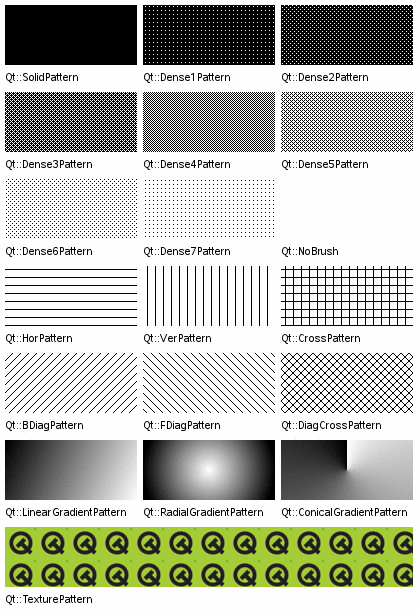
| 常量 | 值 | 描述 |
|---|---|---|
Qt::NoBrush
|
0
|
沒有筆刷圖案。 |
Qt::SolidPattern
|
1
|
統一顔色。 |
Qt::Dense1Pattern
|
2
|
極度密集的筆刷圖案。 |
Qt::Dense2Pattern
|
3
|
非常密集的筆刷圖案。 |
Qt::Dense3Pattern
|
4
|
有點密集的筆刷圖案。 |
Qt::Dense4Pattern
|
5
|
一半密集的筆刷圖案。 |
Qt::Dense5Pattern
|
6
|
有點稀疏的筆刷圖案。 |
Qt::Dense6Pattern
|
7
|
非常稀疏的筆刷圖案。 |
Qt::Dense7Pattern
|
8
|
極度稀疏的筆刷圖案。 |
Qt::HorPattern
|
9
|
水平綫。 |
Qt::VerPattern
|
10
|
垂直綫。 |
Qt::CrossPattern
|
11
|
交叉水平綫和垂直綫。 |
Qt::BDiagPattern
|
12
|
嚮後的對角綫。 |
Qt::FDiagPattern
|
13
|
嚮前的對角綫。 |
Qt::DiagCrossPattern
|
14
|
交叉對角綫。 |
Qt::LinearGradientPattern
|
15
|
綫性漸變 (設置使用專用 QBrush 構造函數)。 |
Qt::ConicalGradientPattern
|
17
|
錐形漸變 (設置使用專用 QBrush 構造函數)。 |
Qt::RadialGradientPattern
|
16
|
徑嚮漸變 (設置使用專用 QBrush 構造函數)。 |
Qt::TexturePattern
|
24
|
自定義圖案 (見 QBrush::setTexture ()). |
另請參閱 QBrush .
| 常量 | 值 |
|---|---|
Qt::CaseInsensitive
|
0
|
Qt::CaseSensitive
|
1
|
此枚舉描述可復選項、控件及 Widget 的狀態。
| 常量 | 值 | 描述 |
|---|---|---|
Qt::Unchecked
|
0
|
項被取消復選。 |
Qt::PartiallyChecked
|
1
|
項被部分復選。在分層模型中的項可能被部分復選,若復選某些而非全部子級。 |
Qt::Checked
|
2
|
項被復選。 |
另請參閱 QCheckBox , Qt::ItemFlags ,和 Qt::ItemDataRole .
| 常量 | 值 | 描述 |
|---|---|---|
Qt::NoClip
|
0
|
此操作關閉裁剪。 |
Qt::ReplaceClip
|
1
|
以函數調用中提供的,替換當前裁剪路徑/矩形/區域。 |
Qt::IntersectClip
|
2
|
相交當前裁剪路徑/矩形/區域與函數調用所提供的。 |
Qt::UniteClip
|
3
|
Unites the current clip path/rect/region with the one supplied in the function call. |
此枚舉描述可以用於信號和槽之間的連接類型。尤其,它確定是把特定信號立即交付給槽,還是在以後隊列交付。
| 常量 | 值 | 描述 |
|---|---|---|
Qt::AutoConnection
|
0
|
(default) If the signal is emitted from a different thread than the receiving object, the signal is queued, behaving as Qt::QueuedConnection. Otherwise, the slot is invoked directly, behaving as Qt::DirectConnection. The type of connection is determined when the signal is emitted. |
Qt::DirectConnection
|
1
|
The slot is invoked immediately, when the signal is emitted. |
Qt::QueuedConnection
|
2
|
槽被援引,當控製返迴給接收者綫程的事件循環時。在接收者綫程中執行槽。 |
Qt::BlockingQueuedConnection
|
4
|
Same as QueuedConnection, except the current thread blocks until the slot returns. This connection type should only be used where the emitter and receiver are in different threads. |
注意: Violating this rule can cause your application to deadlock.
| 常量 | 值 | 描述 |
|---|---|---|
Qt::UniqueConnection
|
0x80
|
Same as AutoConnection, but the connection is made only if it does not duplicate an existing connection. i.e., if the same signal is already connected to the same slot for the same pair of objects, then the connection will fail. This connection type was introduced in Qt 4.6. |
Qt::AutoCompatConnection
|
3
|
The default type when Qt 3 support is enabled. Same as AutoConnection but will also cause warnings to be output in certain situations. See Compatibility Signals and Slots for further information. |
采用隊列連接,參數類型必須是 Qt 元對象係統知道的,因為 Qt 需要拷貝自變量以存儲它們在幕後事件中。若試著隊列排隊連接並獲得錯誤消息:
QObject::connect: Cannot queue arguments of type 'MyType'
調用 qRegisterMetaType () 以注冊數據類型在建立連接之前。
當使用信號和槽采用多個綫程時,見 信號和槽跨綫程 .
另請參閱 Qt 中的綫程支持 , QObject::connect (), qRegisterMetaType (),和 Q_DECLARE_METATYPE ().
此枚舉類型定義 Widget 在展示上下文菜單方麵可以采用的各種策略。
| 常量 | 值 | 描述 |
|---|---|---|
Qt::NoContextMenu
|
0
|
Widget 不提供上下文菜單,上下文菜單的處理是推遲到 Widget 父級。 |
Qt::PreventContextMenu
|
4
|
Widget 不提供上下文菜單,且相比
NoContextMenu
,處理
not
deferred to the widget's parent. This means that all right mouse button events are guaranteed to be delivered to the widget itself through mousePressEvent(), and mouseReleaseEvent().
|
Qt::DefaultContextMenu
|
1
|
Widget 的 QWidget::contextMenuEvent () 處理程序被調用。 |
Qt::ActionsContextMenu
|
2
|
Widget 顯示其 QWidget::actions () 作為上下文菜單。 |
Qt::CustomContextMenu
|
3
|
Widget 發射 QWidget::customContextMenuRequested () 信號。 |
此枚舉指定坐標係。
| 常量 | 值 | 描述 |
|---|---|---|
Qt::DeviceCoordinates
|
0
|
坐標相對於對象描繪設備的左上角。 |
Qt::LogicalCoordinates
|
1
|
坐標相對於對象的左上角。 |
該枚舉在 Qt 4.6 引入或被修改。
此枚舉類型指定矩形角落:
| 常量 | 值 | 描述 |
|---|---|---|
Qt::TopLeftCorner
|
0x00000
|
矩形左上角。 |
Qt::TopRightCorner
|
0x00001
|
矩形的右上角。 |
Qt::BottomLeftCorner
|
0x00002
|
矩形的左下角。 |
Qt::BottomRightCorner
|
0x00003
|
矩形的右下角。 |
此枚舉描述文本光標的可用移動樣式。選項:
| 常量 | 值 | 描述 |
|---|---|---|
Qt::LogicalMoveStyle
|
0
|
在從左到右文本塊中,按下嚮左箭頭鍵時遞減光標位置,按下嚮右箭頭鍵時遞增光標位置。若文本塊是從右到左,則應用相反的行為。應用相反行為。 |
Qt::VisualMoveStyle
|
1
|
按左箭頭鍵始終導緻光標嚮左移動,不管文本書寫方嚮。按右箭頭鍵始終導緻光標嚮右移動。 |
該枚舉在 Qt 4.8 引入或被修改。
此枚舉類型定義可以使用的各種光標。
標準箭頭光標是處於正常狀態的 Widget 的默認值。
| 常量 | 值 | 描述 |
|---|---|---|
Qt::ArrowCursor
|
0
|
 標準箭頭光標。
|
Qt::UpArrowCursor
|
1
|
 嚮上指嚮屏幕頂部的箭頭。
|
Qt::CrossCursor
|
2
|
 十字瞄準綫光標,通常用於幫助用戶精確選擇屏幕點。
|
Qt::WaitCursor
|
3
|
 沙漏或手錶光標,通常在阻止用戶和應用程序交互的操作期間展示。
|
Qt::IBeamCursor
|
4
|
 ^ 插入符號或 I-beam 光標,指示 Widget 可以接受和顯示文本輸入。
|
Qt::SizeVerCursor
|
5
|
 用於垂直重置頂層窗口大小的元素的光標。
|
Qt::SizeHorCursor
|
6
|
 用於水平重置頂層窗口大小的元素的光標。
|
Qt::SizeBDiagCursor
|
7
|
 用於在右上角和左下角對角重置頂層窗口大小的元素的光標。
|
Qt::SizeFDiagCursor
|
8
|
 用於在左上角和右下角對角重置頂層窗口大小的元素的光標。
|
Qt::SizeAllCursor
|
9
|
 用於在任何方嚮重置頂層窗口大小的元素的光標。
|
Qt::BlankCursor
|
10
|
空白/不可見光標,通常在需要隱藏光標形狀時使用。 |
Qt::SplitVCursor
|
11
|
 用於垂直分割器的光標,指示可以水平拖拽手柄以調節可用空間的使用。
|
Qt::SplitHCursor
|
12
|
 用於水平分割器的光標,指示可以垂直拖拽手柄以調節可用空間的使用。
|
Qt::PointingHandCursor
|
13
|
 指嚮手形光標,通常用於可點擊元素,譬如:超鏈接。
|
Qt::ForbiddenCursor
|
14
|
 斜杠圓形光標,通常在拖放操作期間使用,指示拖拽內容不可以掉落在特定 Widget 中 (或某些區域內)。
|
Qt::OpenHandCursor
|
17
|
 錶示張開手的光標,通常用於指示光標下區域是畫布的可見部分,用戶可以單擊並拖拽環繞捲動。
|
Qt::ClosedHandCursor
|
18
|
 錶示閉閤手的光標,通常用於指示正涉及捲動的拖拽操作。
|
Qt::WhatsThisCursor
|
15
|
 帶 ? (問號) 的箭頭,通常用於指示存在 What's This? 小部件幫助。
|
Qt::BusyCursor
|
16
|
 沙漏或手錶光標,通常在允許用戶在後颱履行與應用程序交互的操作期間展示。
|
Qt::DragMoveCursor
|
20
|
通常使用的光標當拖拽項時。 |
Qt::DragCopyCursor
|
19
|
通常使用的光標當拖拽項以拷貝它時。 |
Qt::DragLinkCursor
|
21
|
通常使用的光標當拖拽項以鏈接到它時。 |
Qt::BitmapCursor
|
24
|
| 常量 | 值 | 描述 |
|---|---|---|
Qt::TextDate
|
0
|
The default Qt format, which includes the day and month name, the day number in the month, and the year in full. The day and month names will be short, localized names. This is basically equivalent to using the date format string, "ddd MMM d yyyy". See QDate::toString () 瞭解更多信息。 |
Qt::ISODate
|
1
|
ISO 8601
擴展格式:要麼
YYYY-MM-DD
for dates or
YYYY-MM-DDTHH:mm:ss
,
YYYY-MM-DDTHH:mm:ssTZD
(e.g., 1997-07-16T19:20:30+01:00) for combined dates and times.
|
Qt::SystemLocaleShortDate
|
? | The short 格式 用於 操作係統 . |
Qt::SystemLocaleLongDate
|
? | The long 格式 用於 操作係統 . |
Qt::DefaultLocaleShortDate
|
? | The short 格式 指定通過 應用程序的區域設置 . |
Qt::DefaultLocaleLongDate
|
? | The long 格式 用於 應用程序的區域設置 . |
Qt::SystemLocaleDate
|
2
|
此枚舉值被棄用。 使用 Qt::SystemLocaleShortDate 代替 (或 Qt::SystemLocaleLongDate 若想要 long 日期)。 |
Qt::LocaleDate
|
? | 此枚舉值被棄用。 使用 Qt::DefaultLocaleShortDate 代替 (或 Qt::DefaultLocaleLongDate 若想要 long 日期)。 |
Qt::LocalDate
|
SystemLocaleDate
|
此枚舉值被棄用。 使用 Qt::SystemLocaleShortDate 代替 (或 Qt::SystemLocaleLongDate 若想要 long 日期)。 |
注意:
For
ISODate
格式,各
Y
,
M
and
D
represents a single digit of the year, month and day used to specify the date. Each
H
,
M
and
S
represents a single digit of the hour, minute and second used to specify the time. The presence of a literal
T
character is used to separate the date and time when both are specified.
| 常量 | 值 |
|---|---|
Qt::Monday
|
1
|
Qt::Tuesday
|
2
|
Qt::Wednesday
|
3
|
Qt::Thursday
|
4
|
Qt::Friday
|
5
|
Qt::Saturday
|
6
|
Qt::Sunday
|
7
|
| 常量 | 值 |
|---|---|
Qt::LeftDockWidgetArea
|
0x1
|
Qt::RightDockWidgetArea
|
0x2
|
Qt::TopDockWidgetArea
|
0x4
|
Qt::BottomDockWidgetArea
|
0x8
|
Qt::AllDockWidgetAreas
|
DockWidgetArea_Mask
|
Qt::NoDockWidgetArea
|
0
|
DockWidgetAreas 類型是 typedef 對於 QFlags <DockWidgetArea>。它存儲 DockWidgetArea 值的 OR 組閤。
| 常量 | 值 | 描述 |
|---|---|---|
Qt::CopyAction
|
0x1
|
將數據拷貝到目標。 |
Qt::MoveAction
|
0x2
|
將數據從源移到目標。 |
Qt::LinkAction
|
0x4
|
創建從源到目標的鏈接。 |
Qt::ActionMask
|
0xff
|
|
Qt::IgnoreAction
|
0x0
|
忽略動作 (對數據什麼都不做)。 |
Qt::TargetMoveAction
|
0x8002
|
On Windows, this value is used when the ownership of the D&D data should be taken over by the target application, i.e., the source application should not delete the data.
On X11 this value is used to do a move. TargetMoveAction is not used on the Mac. |
DropActions 類型是 typedef 對於 QFlags <DropAction>。它存儲 DropAction 值的 OR 組閤。
此枚舉可用於指定事件優先級。
| 常量 | 值 | 描述 |
|---|---|---|
Qt::HighEventPriority
|
1
|
發送具有此優先級的事件,在具有 NormalEventPriority (或 LowEventPriority) 事件之前。 |
Qt::NormalEventPriority
|
0
|
具有此優先級的事件在具有 HighEventPriority 的事件之後 (但在具有 LowEventPriority 的事件之前) 發送。 |
Qt::LowEventPriority
|
-1
|
具有此優先級的事件在具有 HighEventPriority (或 NormalEventPriority) 的事件之後發送。 |
注意,提供這些值純粹是為瞭方便,因為事件優先級可以是任意值介於
INT_MAX
and
INT_MIN
(包括在內)。例如,可以將自定義優先級定義成彼此相對:
enum CustomEventPriority
{
    // An important event
    ImportantEventPriority = Qt::HighEventPriority,
    // A more important event
    MoreImportantEventPriority = ImportantEventPriority + 1,
    // A critical event
    CriticalEventPriority = 100 * MoreImportantEventPriority,
    // Not that important
    StatusEventPriority = Qt::LowEventPriority,
    // These are less important than Status events
    IdleProcessingDoneEventPriority = StatusEventPriority - 1
};
另請參閱 QCoreApplication::postEvent ().
指定應該使用哪種方法來填充路徑和多邊形。
| 常量 | 值 | 描述 |
|---|---|---|
Qt::OddEvenFill
|
0
|
指定使用奇偶填充規則填充區域。根據此規則,通過使用隨後方法確定點是否在形狀內。從該點繪製水平綫到形狀外部位置,計算交點數。若交點數為奇數,則點在形狀內。這是默認模式。 |
Qt::WindingFill
|
1
|
指定使用非 0 捲繞規則填充區域。根據此規則,通過使用隨後方法確定點是否在形狀內。從該點繪製水平綫到形狀外部位置。確定每個交點處綫的方嚮是嚮上,還是嚮下。通過求和每交叉點方嚮,確定捲繞數。若數字非 0,則點位於形狀內。在大多數情況下,此填充模式還被認為是閉閤形狀的交集。 |
此枚舉類型定義 Widget 在獲得鍵盤聚焦方麵可以擁有的各種策略。
| 常量 | 值 | 描述 |
|---|---|---|
Qt::TabFocus
|
0x1
|
Widget 通過 Tab 鍵接受聚焦。 |
Qt::ClickFocus
|
0x2
|
Widget 通過點擊接受聚焦。 |
Qt::StrongFocus
|
TabFocus | ClickFocus | 0x8
|
the widget accepts focus by both tabbing and clicking. On Mac OS X this will also be indicate that the widget accepts tab focus when in 'Text/List focus mode'. |
Qt::WheelFocus
|
StrongFocus | 0x4
|
像 Qt::StrongFocus + 小部件通過使用鼠標滾輪接受聚焦。 |
Qt::NoFocus
|
0
|
Widget 不接受聚焦。 |
此枚舉指定聚焦為什麼改變。它會被傳遞透過 QWidget::setFocus 且可以檢索在 QFocusEvent 被發送給 Widget 當聚焦改變時。
| 常量 | 值 | 描述 |
|---|---|---|
Qt::MouseFocusReason
|
0
|
齣現鼠標動作。 |
Qt::TabFocusReason
|
1
|
按下 Tab 鍵。 |
Qt::BacktabFocusReason
|
2
|
發生 Backtab。輸入可能包括 Shift 或 Control 鍵;如 Shift+Tab。 |
Qt::ActiveWindowFocusReason
|
3
|
窗口係統使此窗口活動 (或不活動)。 |
Qt::PopupFocusReason
|
4
|
應用程序打開/關閉彈齣窗口,抓取/釋放鍵盤焦點。 |
Qt::ShortcutFocusReason
|
5
|
用戶鍵入標簽的好友快捷方式 |
Qt::MenuBarFocusReason
|
6
|
菜單欄獲得聚焦。 |
Qt::OtherFocusReason
|
7
|
另一原因,通常特定於應用程序。 |
另請參閱 鍵盤聚焦 .
此枚舉類型描述可以使用的額外標誌,當訂閱手勢時。
| 常量 | 值 | 描述 |
|---|---|---|
Qt::DontStartGestureOnChildren
|
0x01
|
默認情況下,手勢可以從 Widget 或其任何子級開始。使用此標誌可禁用此並僅允許從 Widget 開始手勢。 |
Qt::ReceivePartialGestures
|
0x02
|
允許將任何忽略手勢事件傳播給有指定此提示的父級 Widget。默認情況下,手勢處於 Qt::GestureStarted 狀態纔被傳播且 Widget 始終獲取完整手勢序列開始采用手勢處於 Qt::GestureStarted 狀態和結束采用手勢處於 Qt::GestureFinished or Qt::GestureCanceled 狀態。 |
Qt::IgnoredGesturesPropagateToParent
|
0x04
|
從 Qt 4.7 起,此標誌允許微調手勢事件傳播。通過設置標誌當 grabbing 手勢,全部忽略的部分手勢將被傳播給其父級項。 |
該枚舉在 Qt 4.6 引入或被修改。
GestureFlags 類型是 typedef 對於 QFlags <GestureFlag>。它存儲 GestureFlag 值的 OR 組閤。
另請參閱 QWidget::grabGesture () 和 QGraphicsObject::grabGesture ().
此枚舉類型描述手勢的狀態。
| 常量 | 值 | 描述 |
|---|---|---|
Qt::GestureStarted
|
1
|
連續手勢已開始。 |
Qt::GestureUpdated
|
2
|
手勢繼續。 |
Qt::GestureFinished
|
3
|
手勢已完成。 |
Qt::GestureCanceled
|
4
|
手勢被取消。 |
該枚舉在 Qt 4.6 引入或被修改。
另請參閱 QGesture .
此枚舉類型描述標準手勢。
| 常量 | 值 | 描述 |
|---|---|---|
Qt::TapGesture
|
1
|
敲擊手勢。 |
Qt::TapAndHoldGesture
|
2
|
敲擊並保持 (長敲擊) 手勢。 |
Qt::PanGesture
|
3
|
平移手勢。 |
Qt::PinchGesture
|
4
|
捏閤手勢。 |
Qt::SwipeGesture
|
5
|
輕掃手勢。 |
Qt::CustomGesture
|
0x0100
|
可以用於測試的標誌,若手勢是用戶定義手勢 ID。 |
注冊用戶定義手勢采用 QGestureRecognizer::registerRecognizer () 函數,其生成帶 Qt::CustomGesture 設置標誌的自定義手勢 ID。
該枚舉在 Qt 4.6 引入或被修改。
另請參閱 QGesture , QWidget::grabGesture (),和 QGraphicsObject::grabGesture ().
Qt 的預定義 QColor 對象:
| 常量 | 值 | 描述 |
|---|---|---|
Qt::white
|
3
|
白色 (#ffffff) |
Qt::black
|
2
|
黑色 (#000000) |
Qt::red
|
7
|
紅色 (#ff0000) |
Qt::darkRed
|
13
|
深紅色 (#800000) |
Qt::green
|
8
|
綠色 (#00ff00) |
Qt::darkGreen
|
14
|
深綠色 (#008000) |
Qt::blue
|
9
|
藍色 (#0000ff) |
Qt::darkBlue
|
15
|
深藍色 (#000080) |
Qt::cyan
|
10
|
青色 (#00ffff) |
Qt::darkCyan
|
16
|
深青色 (#008080) |
Qt::magenta
|
11
|
洋紅色 (#ff00ff) |
Qt::darkMagenta
|
17
|
深洋紅色 (#800080) |
Qt::yellow
|
12
|
黃色 (#ffff00) |
Qt::darkYellow
|
18
|
深黃色 (#808000) |
Qt::gray
|
5
|
灰色 (#a0a0a4) |
Qt::darkGray
|
4
|
深灰色 (#808080) |
Qt::lightGray
|
6
|
淺灰色 (#c0c0c0) |
Qt::transparent
|
19
|
透明黑色值 (即, QColor (0, 0, 0, 0)) |
Qt::color0
|
0
|
0 像素值 (用於位圖) |
Qt::color1
|
1
|
1 像素值 (用於位圖) |
另請參閱 QColor .
Platform-specific handle type for system objects. This is equivalent to
void *
on Mac OS X and embedded Linux, and to
unsigned long
on X11. On Windows it is the DWORD returned by the Win32 function getCurrentThreadId().
警告: Using this type is not portable.
此枚舉包含的精度類型可以用於 QTextDocument 類當測試鼠標點擊文本文檔時。
| 常量 | 值 | 描述 |
|---|---|---|
Qt::ExactHit
|
0
|
輸入齣現點必須與文檔的輸入敏感部分準確重閤。 |
Qt::FuzzyHit
|
1
|
輸入齣現點可以接近文檔的輸入敏感部分。 |
This enum is defined in the
<QTextDocument>
頭文件。
選項標記設置 default,若不包括來自列錶的其它值 (由於默認為 0):
彩色/單色首選 (被忽略對於 QBitmap ):
| 常量 | 值 | 描述 |
|---|---|---|
Qt::AutoColor
|
0x00000000
|
(默認) - 若圖像有 depth 1 且隻包含黑色和白色像素,像素圖變為單色。 |
Qt::ColorOnly
|
0x00000003
|
像素圖抖動/轉換為 本機顯示深度 . |
Qt::MonoOnly
|
0x00000002
|
像素圖變成單色。若有必要,使用所選抖動算法進行抖動。 |
Dithering mode preference for RGB channels:
| 常量 | 值 | 描述 |
|---|---|---|
Qt::DiffuseDither
|
0x00000000
|
(default) - A high-quality dither. |
Qt::OrderedDither
|
0x00000010
|
A faster, more ordered dither. |
Qt::ThresholdDither
|
0x00000020
|
沒有抖動;使用最接近的顔色。 |
Dithering mode preference for alpha channel:
| 常量 | 值 | 描述 |
|---|---|---|
Qt::ThresholdAlphaDither
|
0x00000000
|
(默認) - 沒有抖動。 |
Qt::OrderedAlphaDither
|
0x00000004
|
A faster, more ordered dither. |
Qt::DiffuseAlphaDither
|
0x00000008
|
A high-quality dither. |
顔色匹配 vs 抖動偏好:
| 常量 | 值 | 描述 |
|---|---|---|
Qt::PreferDither
|
0x00000040
|
(default when converting to a pixmap) - Always dither 32-bit images when the image is converted to 8 bits. |
Qt::AvoidDither
|
0x00000080
|
(default when converting for the purpose of saving to file) - Dither 32-bit images only if the image has more than 256 colors and it is being converted to 8 bits. |
Qt::NoOpaqueDetection
|
0x00000100
|
不校驗圖像是否包含透明像素。使用這,若知道圖像是半透明的,且想要避免校驗圖像像素 (直到找到不透明像素為止) 的開銷,或者若齣於某些其它原因想要像素圖保留 Alpha 通道。若圖像沒有 Alpha 通道,此標誌不起作用。 |
不對圖像做任何格式轉換。可能很有用當轉換 QImage 到 QPixmap for a one-time rendering operation for example.
ImageConversionFlags 類型是 typedef 對於 QFlags <ImageConversionFlag>。它存儲 ImageConversionFlag 值的 OR 組閤。
| 常量 | 值 | 描述 |
|---|---|---|
Qt::ImhNone
|
0x0
|
沒有提示。 |
更改行為的標誌:
| 常量 | 值 | 描述 |
|---|---|---|
Qt::ImhHiddenText
|
0x1
|
Characters should be hidden, as is typically used when entering passwords. This is automatically set when setting
QLineEdit::echoMode
to
Password
.
|
Qt::ImhNoAutoUppercase
|
0x2
|
輸入法不應該試著自動切換到大寫當句子結束時。 |
Qt::ImhPreferNumbers
|
0x4
|
數字是首選的 (但不是必需的)。 |
Qt::ImhPreferUppercase
|
0x8
|
大寫字母是首選的 (但不是必需的)。 |
Qt::ImhPreferLowercase
|
0x10
|
小寫字母是首選的 (但不是必需的)。 |
Qt::ImhNoPredictiveText
|
0x20
|
鍵入時不使用預測文本 (即:查找字典)。 |
限定輸入的標誌 (排斥標誌):
| 常量 | 值 | 描述 |
|---|---|---|
Qt::ImhDigitsOnly
|
0x10000
|
隻允許數字。 |
Qt::ImhFormattedNumbersOnly
|
0x20000
|
隻允許輸入數字。這包括小數點和負號。 |
Qt::ImhUppercaseOnly
|
0x40000
|
隻允許輸入大寫字母。 |
Qt::ImhLowercaseOnly
|
0x80000
|
隻允許輸入小寫字母。 |
Qt::ImhDialableCharactersOnly
|
0x100000
|
Only characters suitable for phone dialling are allowed. |
Qt::ImhEmailCharactersOnly
|
0x200000
|
隻允許適於 Email 地址的字符。 |
Qt::ImhUrlCharactersOnly
|
0x400000
|
隻允許適於 URL 的字符。 |
掩碼:
| 常量 | 值 | 描述 |
|---|---|---|
Qt::ImhExclusiveInputMask
|
0xffff0000
|
此掩碼産生非 0 若使用任何排斥標誌。 |
注意:
If several exclusive flags are ORed together, the resulting character set will consist of the union of the specified sets. For instance specifying
ImhNumbersOnly
and
ImhUppercaseOnly
將産生由數字和大寫字母組成的集。
InputMethodHints 類型是 typedef 對於 QFlags <InputMethodHint>。它存儲 InputMethodHint 值的 OR 組閤。
另請參閱 QGraphicsItem::inputMethodHints ().
| 常量 | 值 | 描述 |
|---|---|---|
Qt::ImMicroFocus
|
0
|
在 Widget 坐標中覆蓋輸入光標區域的矩形。 |
Qt::ImFont
|
1
|
目前文本輸入使用的字體。 |
Qt::ImCursorPosition
|
2
|
在環繞輸入區域文本中的光標邏輯位置 (見
ImSurroundingText
).
|
Qt::ImSurroundingText
|
3
|
輸入區域周圍的純文本,例如:當前段落。 |
Qt::ImCurrentSelection
|
4
|
目前選中的文本。 |
Qt::ImMaximumTextLength
|
5
|
The maximum number of characters that the widget can hold. If there is no limit, QVariant() is returned. |
Qt::ImAnchorPosition
|
6
|
選定錨點的位置。這可能小於或大於
ImCursorPosition
, 從屬光標選擇哪側。若未選擇,它的返迴如同
ImCursorPosition
.
|
模型中每項擁有一組與之關聯的數據元素,每數據元素帶有其自己的角色。視圖使用角色來指示模型,其需要哪種數據類型。自定義模型應該返迴這些類型的數據。
一般用途的角色 (和關聯的類型):
| 常量 | 值 | 描述 |
|---|---|---|
Qt::DisplayRole
|
0
|
要以文本形式渲染的關鍵數據。( QString ) |
Qt::DecorationRole
|
1
|
以圖標形式被渲染作為裝飾的數據。( QColor , QIcon or QPixmap ) |
Qt::EditRole
|
2
|
按適於在編輯器中編輯的形式錶示數據。( QString ) |
Qt::ToolTipRole
|
3
|
被顯示在項工具提示中的數據。( QString ) |
Qt::StatusTipRole
|
4
|
被顯示在狀態欄中的數據。( QString ) |
Qt::WhatsThisRole
|
5
|
在 What's This? 方式下被顯示的項數據。( QString ) |
Qt::SizeHintRole
|
13
|
會被提供給視圖的項大小提示。( QSize ) |
描述外觀和元數據的角色 (與關聯類型):
| 常量 | 值 | 描述 |
|---|---|---|
Qt::FontRole
|
6
|
用於采用默認委托渲染項的字體。( QFont ) |
Qt::TextAlignmentRole
|
7
|
采用默認委托渲染項的文本對齊方式。( Qt::AlignmentFlag ) |
Qt::BackgroundRole
|
8
|
用於采用默認委托渲染項的背景筆刷。( QBrush ) |
Qt::BackgroundColorRole
|
8
|
此角色已過時。使用 BackgroundRole 代替。 |
Qt::ForegroundRole
|
9
|
用於采用默認委托渲染項的前景筆刷 (文本顔色,通常)。( QBrush ) |
Qt::TextColorRole
|
9
|
此角色已過時。使用 ForegroundRole 代替。 |
Qt::CheckStateRole
|
10
|
此角色被用於獲取項的被復選狀態。( Qt::CheckState ) |
Qt::InitialSortOrderRole
|
14
|
此角色用於獲取 Header (頭) 視圖區間的初始排序次序。( Qt::SortOrder )。此角色在 Qt 4.8 引入。 |
可訪問性角色 (與關聯類型):
| 常量 | 值 | 描述 |
|---|---|---|
Qt::AccessibleTextRole
|
11
|
要被用於可訪問性擴展和插件 (如:屏幕閱讀器) 的文本。( QString ) |
Qt::AccessibleDescriptionRole
|
12
|
用於可訪問性目的項描述。( QString ) |
用戶角色:
| 常量 | 值 | 描述 |
|---|---|---|
Qt::UserRole
|
32
|
可以被用於特定應用程序目的第一角色。 |
對於用戶角色,由開發者決定要使用哪種類型,並確保組件使用正確類型,當訪問和設置數據時。
此枚舉描述項的特性:
| 常量 | 值 | 描述 |
|---|---|---|
Qt::NoItemFlags
|
0
|
它沒有設置任何特性。 |
Qt::ItemIsSelectable
|
1
|
它可以被選中。 |
Qt::ItemIsEditable
|
2
|
它可以被編輯。 |
Qt::ItemIsDragEnabled
|
4
|
可以拖拽它。 |
Qt::ItemIsDropEnabled
|
8
|
可以將它用作掉落目標。 |
Qt::ItemIsUserCheckable
|
16
|
它可以被用戶復選 (或取消復選)。 |
Qt::ItemIsEnabled
|
32
|
用戶可以與項交互。 |
Qt::ItemIsTristate
|
64
|
The item is checkable with three separate states. |
注意,需要為可復選項提供一組閤適標誌和初始狀態,以指示項是否被選中。這是模型/視圖組件自動處理的,但需要明確設置為實例化的 QListWidgetItem , QTableWidgetItem ,和 QTreeWidgetItem .
ItemFlags 類型是 typedef 對於 QFlags <ItemFlag>。它存儲 ItemFlag 值的 OR (或) 組閤。
另請參閱 QAbstractItemModel .
此枚舉用於 QGraphicsItem , QGraphicsScene and QGraphicsView to specify how items are selected, or how to determine if a shapes and items collide.
| 常量 | 值 | 描述 |
|---|---|---|
Qt::ContainsItemShape
|
0x0
|
輸齣列錶僅包含項, shape 完全包含在選定區域內。與區域輪廓相交的項不包括。 |
Qt::IntersectsItemShape
|
0x1
|
輸齣列錶包含兩者項, shape 完全包含在選定區域內,和與區域輪廓相交的項。這是橡皮筋選定的常用模式。 |
Qt::ContainsItemBoundingRect
|
0x2
|
輸齣列錶僅包含項, 邊界矩形 完全包含在選定區域內。與區域輪廓相交的項不包括。 |
Qt::IntersectsItemBoundingRect
|
0x3
|
輸齣列錶包含兩者項, 邊界矩形 完全包含在選定區域內,和與區域輪廓相交的項。此方法常用於確定需要重新繪製的區域。 |
另請參閱 QGraphicsScene::items (), QGraphicsScene::collidingItems (), QGraphicsView::items (), QGraphicsItem::collidesWithItem (),和 QGraphicsItem::collidesWithPath ().
Qt 使用的鍵名。
| 常量 | 值 | 描述 |
|---|---|---|
Qt::Key_Escape
|
0x01000000
|
|
Qt::Key_Tab
|
0x01000001
|
|
Qt::Key_Backtab
|
0x01000002
|
|
Qt::Key_Backspace
|
0x01000003
|
|
Qt::Key_Return
|
0x01000004
|
|
Qt::Key_Enter
|
0x01000005
|
通常位於 Keypad (小鍵盤) 上。 |
Qt::Key_Insert
|
0x01000006
|
|
Qt::Key_Delete
|
0x01000007
|
|
Qt::Key_Pause
|
0x01000008
|
Pause/Break 鍵 ( |
注意: Not anything to do with pausing media)
| 常量 | 值 | 描述 |
|---|---|---|
Qt::Key_Print
|
0x01000009
|
|
Qt::Key_SysReq
|
0x0100000a
|
|
Qt::Key_Clear
|
0x0100000b
|
|
Qt::Key_Home
|
0x01000010
|
|
Qt::Key_End
|
0x01000011
|
|
Qt::Key_Left
|
0x01000012
|
|
Qt::Key_Up
|
0x01000013
|
|
Qt::Key_Right
|
0x01000014
|
|
Qt::Key_Down
|
0x01000015
|
|
Qt::Key_PageUp
|
0x01000016
|
|
Qt::Key_PageDown
|
0x01000017
|
|
Qt::Key_Shift
|
0x01000020
|
|
Qt::Key_Control
|
0x01000021
|
On Mac OS X, this corresponds to the Command keys. |
Qt::Key_Meta
|
0x01000022
|
On Mac OS X, this corresponds to the Control keys. On Windows keyboards, this key is mapped to the Windows key. |
Qt::Key_Alt
|
0x01000023
|
|
Qt::Key_AltGr
|
0x01001103
|
在 Windows 發送此鍵的 KeyDown 事件時,還會設置 Ctrl+Alt 修飾符。 |
Qt::Key_CapsLock
|
0x01000024
|
|
Qt::Key_NumLock
|
0x01000025
|
|
Qt::Key_ScrollLock
|
0x01000026
|
|
Qt::Key_F1
|
0x01000030
|
|
Qt::Key_F2
|
0x01000031
|
|
Qt::Key_F3
|
0x01000032
|
|
Qt::Key_F4
|
0x01000033
|
|
Qt::Key_F5
|
0x01000034
|
|
Qt::Key_F6
|
0x01000035
|
|
Qt::Key_F7
|
0x01000036
|
|
Qt::Key_F8
|
0x01000037
|
|
Qt::Key_F9
|
0x01000038
|
|
Qt::Key_F10
|
0x01000039
|
|
Qt::Key_F11
|
0x0100003a
|
|
Qt::Key_F12
|
0x0100003b
|
|
Qt::Key_F13
|
0x0100003c
|
|
Qt::Key_F14
|
0x0100003d
|
|
Qt::Key_F15
|
0x0100003e
|
|
Qt::Key_F16
|
0x0100003f
|
|
Qt::Key_F17
|
0x01000040
|
|
Qt::Key_F18
|
0x01000041
|
|
Qt::Key_F19
|
0x01000042
|
|
Qt::Key_F20
|
0x01000043
|
|
Qt::Key_F21
|
0x01000044
|
|
Qt::Key_F22
|
0x01000045
|
|
Qt::Key_F23
|
0x01000046
|
|
Qt::Key_F24
|
0x01000047
|
|
Qt::Key_F25
|
0x01000048
|
|
Qt::Key_F26
|
0x01000049
|
|
Qt::Key_F27
|
0x0100004a
|
|
Qt::Key_F28
|
0x0100004b
|
|
Qt::Key_F29
|
0x0100004c
|
|
Qt::Key_F30
|
0x0100004d
|
|
Qt::Key_F31
|
0x0100004e
|
|
Qt::Key_F32
|
0x0100004f
|
|
Qt::Key_F33
|
0x01000050
|
|
Qt::Key_F34
|
0x01000051
|
|
Qt::Key_F35
|
0x01000052
|
|
Qt::Key_Super_L
|
0x01000053
|
|
Qt::Key_Super_R
|
0x01000054
|
|
Qt::Key_Menu
|
0x01000055
|
|
Qt::Key_Hyper_L
|
0x01000056
|
|
Qt::Key_Hyper_R
|
0x01000057
|
|
Qt::Key_Help
|
0x01000058
|
|
Qt::Key_Direction_L
|
0x01000059
|
|
Qt::Key_Direction_R
|
0x01000060
|
|
Qt::Key_Space
|
0x20
|
|
Qt::Key_Any
|
Key_Space
|
|
Qt::Key_Exclam
|
0x21
|
|
Qt::Key_QuoteDbl
|
0x22
|
|
Qt::Key_NumberSign
|
0x23
|
|
Qt::Key_Dollar
|
0x24
|
|
Qt::Key_Percent
|
0x25
|
|
Qt::Key_Ampersand
|
0x26
|
|
Qt::Key_Apostrophe
|
0x27
|
|
Qt::Key_ParenLeft
|
0x28
|
|
Qt::Key_ParenRight
|
0x29
|
|
Qt::Key_Asterisk
|
0x2a
|
|
Qt::Key_Plus
|
0x2b
|
|
Qt::Key_Comma
|
0x2c
|
|
Qt::Key_Minus
|
0x2d
|
|
Qt::Key_Period
|
0x2e
|
|
Qt::Key_Slash
|
0x2f
|
|
Qt::Key_0
|
0x30
|
|
Qt::Key_1
|
0x31
|
|
Qt::Key_2
|
0x32
|
|
Qt::Key_3
|
0x33
|
|
Qt::Key_4
|
0x34
|
|
Qt::Key_5
|
0x35
|
|
Qt::Key_6
|
0x36
|
|
Qt::Key_7
|
0x37
|
|
Qt::Key_8
|
0x38
|
|
Qt::Key_9
|
0x39
|
|
Qt::Key_Colon
|
0x3a
|
|
Qt::Key_Semicolon
|
0x3b
|
|
Qt::Key_Less
|
0x3c
|
|
Qt::Key_Equal
|
0x3d
|
|
Qt::Key_Greater
|
0x3e
|
|
Qt::Key_Question
|
0x3f
|
|
Qt::Key_At
|
0x40
|
|
Qt::Key_A
|
0x41
|
|
Qt::Key_B
|
0x42
|
|
Qt::Key_C
|
0x43
|
|
Qt::Key_D
|
0x44
|
|
Qt::Key_E
|
0x45
|
|
Qt::Key_F
|
0x46
|
|
Qt::Key_G
|
0x47
|
|
Qt::Key_H
|
0x48
|
|
Qt::Key_I
|
0x49
|
|
Qt::Key_J
|
0x4a
|
|
Qt::Key_K
|
0x4b
|
|
Qt::Key_L
|
0x4c
|
|
Qt::Key_M
|
0x4d
|
|
Qt::Key_N
|
0x4e
|
|
Qt::Key_O
|
0x4f
|
|
Qt::Key_P
|
0x50
|
|
Qt::Key_Q
|
0x51
|
|
Qt::Key_R
|
0x52
|
|
Qt::Key_S
|
0x53
|
|
Qt::Key_T
|
0x54
|
|
Qt::Key_U
|
0x55
|
|
Qt::Key_V
|
0x56
|
|
Qt::Key_W
|
0x57
|
|
Qt::Key_X
|
0x58
|
|
Qt::Key_Y
|
0x59
|
|
Qt::Key_Z
|
0x5a
|
|
Qt::Key_BracketLeft
|
0x5b
|
|
Qt::Key_Backslash
|
0x5c
|
|
Qt::Key_BracketRight
|
0x5d
|
|
Qt::Key_AsciiCircum
|
0x5e
|
|
Qt::Key_Underscore
|
0x5f
|
|
Qt::Key_QuoteLeft
|
0x60
|
|
Qt::Key_BraceLeft
|
0x7b
|
|
Qt::Key_Bar
|
0x7c
|
|
Qt::Key_BraceRight
|
0x7d
|
|
Qt::Key_AsciiTilde
|
0x7e
|
|
Qt::Key_nobreakspace
|
0x0a0
|
|
Qt::Key_exclamdown
|
0x0a1
|
|
Qt::Key_cent
|
0x0a2
|
|
Qt::Key_sterling
|
0x0a3
|
|
Qt::Key_currency
|
0x0a4
|
|
Qt::Key_yen
|
0x0a5
|
|
Qt::Key_brokenbar
|
0x0a6
|
|
Qt::Key_section
|
0x0a7
|
|
Qt::Key_diaeresis
|
0x0a8
|
|
Qt::Key_copyright
|
0x0a9
|
|
Qt::Key_ordfeminine
|
0x0aa
|
|
Qt::Key_guillemotleft
|
0x0ab
|
|
Qt::Key_notsign
|
0x0ac
|
|
Qt::Key_hyphen
|
0x0ad
|
|
Qt::Key_registered
|
0x0ae
|
|
Qt::Key_macron
|
0x0af
|
|
Qt::Key_degree
|
0x0b0
|
|
Qt::Key_plusminus
|
0x0b1
|
|
Qt::Key_twosuperior
|
0x0b2
|
|
Qt::Key_threesuperior
|
0x0b3
|
|
Qt::Key_acute
|
0x0b4
|
|
Qt::Key_mu
|
0x0b5
|
|
Qt::Key_paragraph
|
0x0b6
|
|
Qt::Key_periodcentered
|
0x0b7
|
|
Qt::Key_cedilla
|
0x0b8
|
|
Qt::Key_onesuperior
|
0x0b9
|
|
Qt::Key_masculine
|
0x0ba
|
|
Qt::Key_guillemotright
|
0x0bb
|
|
Qt::Key_onequarter
|
0x0bc
|
|
Qt::Key_onehalf
|
0x0bd
|
|
Qt::Key_threequarters
|
0x0be
|
|
Qt::Key_questiondown
|
0x0bf
|
|
Qt::Key_Agrave
|
0x0c0
|
|
Qt::Key_Aacute
|
0x0c1
|
|
Qt::Key_Acircumflex
|
0x0c2
|
|
Qt::Key_Atilde
|
0x0c3
|
|
Qt::Key_Adiaeresis
|
0x0c4
|
|
Qt::Key_Aring
|
0x0c5
|
|
Qt::Key_AE
|
0x0c6
|
|
Qt::Key_Ccedilla
|
0x0c7
|
|
Qt::Key_Egrave
|
0x0c8
|
|
Qt::Key_Eacute
|
0x0c9
|
|
Qt::Key_Ecircumflex
|
0x0ca
|
|
Qt::Key_Ediaeresis
|
0x0cb
|
|
Qt::Key_Igrave
|
0x0cc
|
|
Qt::Key_Iacute
|
0x0cd
|
|
Qt::Key_Icircumflex
|
0x0ce
|
|
Qt::Key_Idiaeresis
|
0x0cf
|
|
Qt::Key_ETH
|
0x0d0
|
|
Qt::Key_Ntilde
|
0x0d1
|
|
Qt::Key_Ograve
|
0x0d2
|
|
Qt::Key_Oacute
|
0x0d3
|
|
Qt::Key_Ocircumflex
|
0x0d4
|
|
Qt::Key_Otilde
|
0x0d5
|
|
Qt::Key_Odiaeresis
|
0x0d6
|
|
Qt::Key_multiply
|
0x0d7
|
|
Qt::Key_Ooblique
|
0x0d8
|
|
Qt::Key_Ugrave
|
0x0d9
|
|
Qt::Key_Uacute
|
0x0da
|
|
Qt::Key_Ucircumflex
|
0x0db
|
|
Qt::Key_Udiaeresis
|
0x0dc
|
|
Qt::Key_Yacute
|
0x0dd
|
|
Qt::Key_THORN
|
0x0de
|
|
Qt::Key_ssharp
|
0x0df
|
|
Qt::Key_division
|
0x0f7
|
|
Qt::Key_ydiaeresis
|
0x0ff
|
|
Qt::Key_Multi_key
|
0x01001120
|
|
Qt::Key_Codeinput
|
0x01001137
|
|
Qt::Key_SingleCandidate
|
0x0100113c
|
|
Qt::Key_MultipleCandidate
|
0x0100113d
|
|
Qt::Key_PreviousCandidate
|
0x0100113e
|
|
Qt::Key_Mode_switch
|
0x0100117e
|
|
Qt::Key_Kanji
|
0x01001121
|
|
Qt::Key_Muhenkan
|
0x01001122
|
|
Qt::Key_Henkan
|
0x01001123
|
|
Qt::Key_Romaji
|
0x01001124
|
|
Qt::Key_Hiragana
|
0x01001125
|
|
Qt::Key_Katakana
|
0x01001126
|
|
Qt::Key_Hiragana_Katakana
|
0x01001127
|
|
Qt::Key_Zenkaku
|
0x01001128
|
|
Qt::Key_Hankaku
|
0x01001129
|
|
Qt::Key_Zenkaku_Hankaku
|
0x0100112a
|
|
Qt::Key_Touroku
|
0x0100112b
|
|
Qt::Key_Massyo
|
0x0100112c
|
|
Qt::Key_Kana_Lock
|
0x0100112d
|
|
Qt::Key_Kana_Shift
|
0x0100112e
|
|
Qt::Key_Eisu_Shift
|
0x0100112f
|
|
Qt::Key_Eisu_toggle
|
0x01001130
|
|
Qt::Key_Hangul
|
0x01001131
|
|
Qt::Key_Hangul_Start
|
0x01001132
|
|
Qt::Key_Hangul_End
|
0x01001133
|
|
Qt::Key_Hangul_Hanja
|
0x01001134
|
|
Qt::Key_Hangul_Jamo
|
0x01001135
|
|
Qt::Key_Hangul_Romaja
|
0x01001136
|
|
Qt::Key_Hangul_Jeonja
|
0x01001138
|
|
Qt::Key_Hangul_Banja
|
0x01001139
|
|
Qt::Key_Hangul_PreHanja
|
0x0100113a
|
|
Qt::Key_Hangul_PostHanja
|
0x0100113b
|
|
Qt::Key_Hangul_Special
|
0x0100113f
|
|
Qt::Key_Dead_Grave
|
0x01001250
|
|
Qt::Key_Dead_Acute
|
0x01001251
|
|
Qt::Key_Dead_Circumflex
|
0x01001252
|
|
Qt::Key_Dead_Tilde
|
0x01001253
|
|
Qt::Key_Dead_Macron
|
0x01001254
|
|
Qt::Key_Dead_Breve
|
0x01001255
|
|
Qt::Key_Dead_Abovedot
|
0x01001256
|
|
Qt::Key_Dead_Diaeresis
|
0x01001257
|
|
Qt::Key_Dead_Abovering
|
0x01001258
|
|
Qt::Key_Dead_Doubleacute
|
0x01001259
|
|
Qt::Key_Dead_Caron
|
0x0100125a
|
|
Qt::Key_Dead_Cedilla
|
0x0100125b
|
|
Qt::Key_Dead_Ogonek
|
0x0100125c
|
|
Qt::Key_Dead_Iota
|
0x0100125d
|
|
Qt::Key_Dead_Voiced_Sound
|
0x0100125e
|
|
Qt::Key_Dead_Semivoiced_Sound
|
0x0100125f
|
|
Qt::Key_Dead_Belowdot
|
0x01001260
|
|
Qt::Key_Dead_Hook
|
0x01001261
|
|
Qt::Key_Dead_Horn
|
0x01001262
|
|
Qt::Key_Back
|
0x01000061
|
|
Qt::Key_Forward
|
0x01000062
|
|
Qt::Key_Stop
|
0x01000063
|
|
Qt::Key_Refresh
|
0x01000064
|
|
Qt::Key_VolumeDown
|
0x01000070
|
|
Qt::Key_VolumeMute
|
0x01000071
|
|
Qt::Key_VolumeUp
|
0x01000072
|
|
Qt::Key_BassBoost
|
0x01000073
|
|
Qt::Key_BassUp
|
0x01000074
|
|
Qt::Key_BassDown
|
0x01000075
|
|
Qt::Key_TrebleUp
|
0x01000076
|
|
Qt::Key_TrebleDown
|
0x01000077
|
|
Qt::Key_MediaPlay
|
0x01000080
|
設置媒體播放器播放狀態的鍵 |
Qt::Key_MediaStop
|
0x01000081
|
設置媒體播放器停止狀態的鍵 |
Qt::Key_MediaPrevious
|
0x01000082
|
|
Qt::Key_MediaNext
|
0x01000083
|
|
Qt::Key_MediaRecord
|
0x01000084
|
|
Qt::Key_MediaPause
|
0x1000085
|
設置媒體播放器暫停狀態的鍵 ( |
注意: not the pause/break key)
| 常量 | 值 | 描述 |
|---|---|---|
Qt::Key_MediaTogglePlayPause
|
0x1000086
|
觸發媒體播放器 "播放/暫停" 狀態的鍵 (而不是設置絕對狀態) |
Qt::Key_HomePage
|
0x01000090
|
|
Qt::Key_Favorites
|
0x01000091
|
|
Qt::Key_Search
|
0x01000092
|
|
Qt::Key_Standby
|
0x01000093
|
|
Qt::Key_OpenUrl
|
0x01000094
|
|
Qt::Key_LaunchMail
|
0x010000a0
|
|
Qt::Key_LaunchMedia
|
0x010000a1
|
|
Qt::Key_Launch0
|
0x010000a2
|
On X11 this key is mapped to "My Computer" (XF86XK_MyComputer) key for legacy reasons. |
Qt::Key_Launch1
|
0x010000a3
|
On X11 this key is mapped to "Calculator" (XF86XK_Calculator) key for legacy reasons. |
Qt::Key_Launch2
|
0x010000a4
|
On X11 this key is mapped to XF86XK_Launch0 key for legacy reasons. |
Qt::Key_Launch3
|
0x010000a5
|
On X11 this key is mapped to XF86XK_Launch1 key for legacy reasons. |
Qt::Key_Launch4
|
0x010000a6
|
On X11 this key is mapped to XF86XK_Launch2 key for legacy reasons. |
Qt::Key_Launch5
|
0x010000a7
|
On X11 this key is mapped to XF86XK_Launch3 key for legacy reasons. |
Qt::Key_Launch6
|
0x010000a8
|
On X11 this key is mapped to XF86XK_Launch4 key for legacy reasons. |
Qt::Key_Launch7
|
0x010000a9
|
On X11 this key is mapped to XF86XK_Launch5 key for legacy reasons. |
Qt::Key_Launch8
|
0x010000aa
|
On X11 this key is mapped to XF86XK_Launch6 key for legacy reasons. |
Qt::Key_Launch9
|
0x010000ab
|
On X11 this key is mapped to XF86XK_Launch7 key for legacy reasons. |
Qt::Key_LaunchA
|
0x010000ac
|
On X11 this key is mapped to XF86XK_Launch8 key for legacy reasons. |
Qt::Key_LaunchB
|
0x010000ad
|
On X11 this key is mapped to XF86XK_Launch9 key for legacy reasons. |
Qt::Key_LaunchC
|
0x010000ae
|
On X11 this key is mapped to XF86XK_LaunchA key for legacy reasons. |
Qt::Key_LaunchD
|
0x010000af
|
On X11 this key is mapped to XF86XK_LaunchB key for legacy reasons. |
Qt::Key_LaunchE
|
0x010000b0
|
On X11 this key is mapped to XF86XK_LaunchC key for legacy reasons. |
Qt::Key_LaunchF
|
0x010000b1
|
On X11 this key is mapped to XF86XK_LaunchD key for legacy reasons. |
Qt::Key_LaunchG
|
0x0100010e
|
On X11 this key is mapped to XF86XK_LaunchE key for legacy reasons. |
Qt::Key_LaunchH
|
0x0100010f
|
On X11 this key is mapped to XF86XK_LaunchF key for legacy reasons. |
Qt::Key_MonBrightnessUp
|
0x010000b2
|
|
Qt::Key_MonBrightnessDown
|
0x010000b3
|
|
Qt::Key_KeyboardLightOnOff
|
0x010000b4
|
|
Qt::Key_KeyboardBrightnessUp
|
0x010000b5
|
|
Qt::Key_KeyboardBrightnessDown
|
0x010000b6
|
|
Qt::Key_PowerOff
|
0x010000b7
|
|
Qt::Key_WakeUp
|
0x010000b8
|
|
Qt::Key_Eject
|
0x010000b9
|
|
Qt::Key_ScreenSaver
|
0x010000ba
|
|
Qt::Key_WWW
|
0x010000bb
|
|
Qt::Key_Memo
|
0x010000bc
|
|
Qt::Key_LightBulb
|
0x010000bd
|
|
Qt::Key_Shop
|
0x010000be
|
|
Qt::Key_History
|
0x010000bf
|
|
Qt::Key_AddFavorite
|
0x010000c0
|
|
Qt::Key_HotLinks
|
0x010000c1
|
|
Qt::Key_BrightnessAdjust
|
0x010000c2
|
|
Qt::Key_Finance
|
0x010000c3
|
|
Qt::Key_Community
|
0x010000c4
|
|
Qt::Key_AudioRewind
|
0x010000c5
|
|
Qt::Key_BackForward
|
0x010000c6
|
|
Qt::Key_ApplicationLeft
|
0x010000c7
|
|
Qt::Key_ApplicationRight
|
0x010000c8
|
|
Qt::Key_Book
|
0x010000c9
|
|
Qt::Key_CD
|
0x010000ca
|
|
Qt::Key_Calculator
|
0x010000cb
|
On X11 this key is not mapped for legacy reasons. Use Qt::Key_Launch1 instead. |
Qt::Key_ToDoList
|
0x010000cc
|
|
Qt::Key_ClearGrab
|
0x010000cd
|
|
Qt::Key_Close
|
0x010000ce
|
|
Qt::Key_Copy
|
0x010000cf
|
|
Qt::Key_Cut
|
0x010000d0
|
|
Qt::Key_Display
|
0x010000d1
|
|
Qt::Key_DOS
|
0x010000d2
|
|
Qt::Key_Documents
|
0x010000d3
|
|
Qt::Key_Excel
|
0x010000d4
|
|
Qt::Key_Explorer
|
0x010000d5
|
|
Qt::Key_Game
|
0x010000d6
|
|
Qt::Key_Go
|
0x010000d7
|
|
Qt::Key_iTouch
|
0x010000d8
|
|
Qt::Key_LogOff
|
0x010000d9
|
|
Qt::Key_Market
|
0x010000da
|
|
Qt::Key_Meeting
|
0x010000db
|
|
Qt::Key_MenuKB
|
0x010000dc
|
|
Qt::Key_MenuPB
|
0x010000dd
|
|
Qt::Key_MySites
|
0x010000de
|
|
Qt::Key_News
|
0x010000df
|
|
Qt::Key_OfficeHome
|
0x010000e0
|
|
Qt::Key_Option
|
0x010000e1
|
|
Qt::Key_Paste
|
0x010000e2
|
|
Qt::Key_Phone
|
0x010000e3
|
|
Qt::Key_Calendar
|
0x010000e4
|
|
Qt::Key_Reply
|
0x010000e5
|
|
Qt::Key_Reload
|
0x010000e6
|
|
Qt::Key_RotateWindows
|
0x010000e7
|
|
Qt::Key_RotationPB
|
0x010000e8
|
|
Qt::Key_RotationKB
|
0x010000e9
|
|
Qt::Key_Save
|
0x010000ea
|
|
Qt::Key_Send
|
0x010000eb
|
|
Qt::Key_Spell
|
0x010000ec
|
|
Qt::Key_SplitScreen
|
0x010000ed
|
|
Qt::Key_Support
|
0x010000ee
|
|
Qt::Key_TaskPane
|
0x010000ef
|
|
Qt::Key_Terminal
|
0x010000f0
|
|
Qt::Key_Tools
|
0x010000f1
|
|
Qt::Key_Travel
|
0x010000f2
|
|
Qt::Key_Video
|
0x010000f3
|
|
Qt::Key_Word
|
0x010000f4
|
|
Qt::Key_Xfer
|
0x010000f5
|
|
Qt::Key_ZoomIn
|
0x010000f6
|
|
Qt::Key_ZoomOut
|
0x010000f7
|
|
Qt::Key_Away
|
0x010000f8
|
|
Qt::Key_Messenger
|
0x010000f9
|
|
Qt::Key_WebCam
|
0x010000fa
|
|
Qt::Key_MailForward
|
0x010000fb
|
|
Qt::Key_Pictures
|
0x010000fc
|
|
Qt::Key_Music
|
0x010000fd
|
|
Qt::Key_Battery
|
0x010000fe
|
|
Qt::Key_Bluetooth
|
0x010000ff
|
|
Qt::Key_WLAN
|
0x01000100
|
|
Qt::Key_UWB
|
0x01000101
|
|
Qt::Key_AudioForward
|
0x01000102
|
|
Qt::Key_AudioRepeat
|
0x01000103
|
|
Qt::Key_AudioRandomPlay
|
0x01000104
|
|
Qt::Key_Subtitle
|
0x01000105
|
|
Qt::Key_AudioCycleTrack
|
0x01000106
|
|
Qt::Key_Time
|
0x01000107
|
|
Qt::Key_Hibernate
|
0x01000108
|
|
Qt::Key_View
|
0x01000109
|
|
Qt::Key_TopMenu
|
0x0100010a
|
|
Qt::Key_PowerDown
|
0x0100010b
|
|
Qt::Key_Suspend
|
0x0100010c
|
|
Qt::Key_ContrastAdjust
|
0x0100010d
|
|
Qt::Key_MediaLast
|
0x0100ffff
|
|
Qt::Key_unknown
|
0x01ffffff
|
|
Qt::Key_Call
|
0x01100004
|
用於迴答 (或初啓) 呼叫的鍵 (見用於觸發當前呼叫狀態的 Qt::Key_ToggleCallHangup 鍵) |
Qt::Key_Camera
|
0x01100020
|
A key to activate the camera shutter |
Qt::Key_CameraFocus
|
0x01100021
|
A key to focus the camera |
Qt::Key_Context1
|
0x01100000
|
|
Qt::Key_Context2
|
0x01100001
|
|
Qt::Key_Context3
|
0x01100002
|
|
Qt::Key_Context4
|
0x01100003
|
|
Qt::Key_Flip
|
0x01100006
|
|
Qt::Key_Hangup
|
0x01100005
|
結束在進行呼叫鍵 (見用於觸發當前呼叫狀態的 Qt::Key_ToggleCallHangup) |
Qt::Key_No
|
0x01010002
|
|
Qt::Key_Select
|
0x01010000
|
|
Qt::Key_Yes
|
0x01010001
|
|
Qt::Key_ToggleCallHangup
|
0x01100007
|
用於觸發當前呼叫狀態 (即:要麼迴答,要麼掛斷) 的鍵,從屬當前呼叫狀態 |
Qt::Key_VoiceDial
|
0x01100008
|
|
Qt::Key_LastNumberRedial
|
0x01100009
|
|
Qt::Key_Execute
|
0x01020003
|
|
Qt::Key_Printer
|
0x01020002
|
|
Qt::Key_Play
|
0x01020005
|
|
Qt::Key_Sleep
|
0x01020004
|
|
Qt::Key_Zoom
|
0x01020006
|
|
Qt::Key_Cancel
|
0x01020001
|
另請參閱 QKeyEvent::key ().
此枚舉描述修飾符鍵。
| 常量 | 值 | 描述 |
|---|---|---|
Qt::NoModifier
|
0x00000000
|
未按下修飾符鍵。 |
Qt::ShiftModifier
|
0x02000000
|
按下鍵盤 Shift 鍵。 |
Qt::ControlModifier
|
0x04000000
|
按下鍵盤 Ctrl 鍵。 |
Qt::AltModifier
|
0x08000000
|
按下鍵盤 Alt 鍵。 |
Qt::MetaModifier
|
0x10000000
|
按下鍵盤 Meta 鍵。 |
Qt::KeypadModifier
|
0x20000000
|
按下 Keypad (小鍵盤) 按鈕。 |
Qt::GroupSwitchModifier
|
0x40000000
|
X11 only. A Mode_switch key on the keyboard is pressed. |
注意:
On Mac OS X, the
ControlModifier
value corresponds to the Command keys on the Macintosh keyboard, and the
MetaModifier
值相當於 Control 鍵。
KeypadModifier
值也將在按下方嚮鍵時設置,因為方嚮鍵被認為是 Keypad (小鍵盤) 的一部分。
注意: 在 Windows 鍵盤 Qt::MetaModifier 和 Qt::Key_Meta 被映射到 Windows 鍵。
KeyboardModifiers 類型是 typedef 對於 QFlags <KeyboardModifier>。它存儲 KeyboardModifier 值的 OR 組閤。
另請參閱 MouseButton and Modifier .
指定 Qt 布局和文本處理的方嚮。
| 常量 | 值 | 描述 |
|---|---|---|
Qt::LeftToRight
|
0
|
從左到右布局。 |
Qt::RightToLeft
|
1
|
從右到左布局。 |
Qt::LayoutDirectionAuto
|
2
|
自動布局。 |
從右到左的布局對於某些語言有必要,尤其是阿拉伯語和希伯來語。
LayoutDirectionAuto 服務 2 種目的。當與 Widget 和布局結閤使用時,暗示使用的布局方嚮設置是在父級小部件或 QApplication 。這有相同效果如 QWidget::unsetLayoutDirection ().
當 LayoutDirectionAuto 與文本布局結閤使用時,暗示文本的方嚮是由要布局的字符串內容確定的。
另請參閱 QApplication::setLayoutDirection (), QWidget::setLayoutDirection (), QTextOption::setTextDirection (),和 QString::isRightToLeft ().
此枚舉指定行為對於 QPixmap::createMaskFromColor () 和 QImage::createMaskFromColor () 函數。
| 常量 | 值 | 描述 |
|---|---|---|
Qt::MaskInColor
|
0
|
創建匹配給定顔色的所有像素都不透明的遮罩。 |
Qt::MaskOutColor
|
1
|
創建匹配給定顔色的所有像素都透明的遮罩。 |
此枚舉描述可以使用的匹配類型,當搜索模型項時。
| 常量 | 值 | 描述 |
|---|---|---|
Qt::MatchExactly
|
0
|
履行 QVariant 的基匹配。 |
Qt::MatchFixedString
|
8
|
履行基於字符串的匹配。基於字符串的比較不區分大小寫,除非
MatchCaseSensitive
標誌也有指定。
|
Qt::MatchContains
|
1
|
搜索術語包含在項中。 |
Qt::MatchStartsWith
|
2
|
搜索術語匹配項開頭。 |
Qt::MatchEndsWith
|
3
|
搜索術語匹配項末尾。 |
Qt::MatchCaseSensitive
|
16
|
搜索區分大小寫。 |
Qt::MatchRegExp
|
4
|
Performs string-based matching using a regular expression as the search term. |
Qt::MatchWildcard
|
5
|
使用具有通配符的字符串作為搜索術語履行基於字符串的匹配。 |
Qt::MatchWrap
|
32
|
履行環繞搜索,因此,當搜索到達模型中的最後項時,再次從第 1 個項開始,並繼續直到所有項被審查。 |
Qt::MatchRecursive
|
64
|
搜索整個層次結構。 |
MatchFlags 類型是 typedef 對於 QFlags <MatchFlag>。它存儲 MatchFlag 值的 OR 組閤。
另請參閱 QString::compare () 和 QRegExp .
此枚舉為 Qt 支持的鍵盤修飾符鍵提供更短名稱。
注意:
On Mac OS X, the
CTRL
value corresponds to the Command keys on the Macintosh keyboard, and the
META
值相當於 Control 鍵。
| 常量 | 值 | 描述 |
|---|---|---|
Qt::SHIFT
|
Qt::ShiftModifier
|
所有標準鍵盤都提供的 Shift 鍵。 |
Qt::META
|
Qt::MetaModifier
|
Meta 鍵。 |
Qt::CTRL
|
Qt::ControlModifier
|
Ctrl 鍵。 |
Qt::ALT
|
Qt::AltModifier
|
正常 Alt 鍵,但不像 AltGr 鍵。 |
Qt::UNICODE_ACCEL
|
0x00000000
|
快捷方式被指定成 Unicode 代碼點,而不是 Qt Key。 |
另請參閱 KeyboardModifier and MouseButton .
此枚舉類型描述不同的鼠標按鈕。
| 常量 | 值 | 描述 |
|---|---|---|
Qt::NoButton
|
0x00000000
|
按鈕狀態不引用任何按鈕 (見 QMouseEvent::button ()). |
Qt::LeftButton
|
0x00000001
|
按下左按鈕,或事件引用左按鈕 (左按鈕可能是左手鼠標的右按鈕)。 |
Qt::RightButton
|
0x00000002
|
右邊按鈕。 |
Qt::MidButton
|
0x00000004
|
中間按鈕。 |
Qt::MiddleButton
|
MidButton
|
中間按鈕。 |
Qt::XButton1
|
0x00000008
|
The first X button. |
Qt::XButton2
|
0x00000010
|
The second X button. |
MouseButtons 類型是 typedef 對於 QFlags <MouseButton>。它存儲 MouseButton 值的 OR 組閤。
另請參閱 KeyboardModifier and Modifier .
此枚舉類型描述移動聚焦的模式。
| 常量 | 值 | 描述 |
|---|---|---|
Qt::NavigationModeNone
|
0
|
僅用於觸摸屏。 |
Qt::NavigationModeKeypadTabOrder
|
1
|
Qt::Key_Up and Qt::Key_Down 被用於改變聚焦。 |
Qt::NavigationModeKeypadDirectional
|
2
|
Qt::Key_Up , Qt::Key_Down , Qt::Key_Left and Qt::Key_Right 被用於改變聚焦。 |
Qt::NavigationModeCursorAuto
|
3
|
使用鼠標光標改變聚焦,僅顯示在非觸摸屏設備中。使用 Keypad (小鍵盤) 實現虛擬光標,除非設備擁有模擬鼠標類型的輸入設備 (如:觸摸闆)。推薦設置這,對於需要在觸摸和非觸摸設備兩者中進行指針控製的應用程序 (譬如 Web 瀏覽器) 而言。 |
Qt::NavigationModeCursorForceVisible
|
4
|
使用鼠標光標改變聚焦,它的顯示不管設備類型。使用 Keypad (小鍵盤) 實現虛擬光標,除非設備擁有模擬鼠標類型的輸入設備 (如:觸摸闆) |
注意: : in 4.6, cursor navigation is only implemented for Symbian OS. On other platforms, it behaves as NavigationModeNone.
該枚舉在 Qt 4.6 引入或被修改。
另請參閱 QApplication::setNavigationMode () 和 QApplication::navigationMode ().
此類型用於錶示對象的取嚮。
| 常量 | 值 |
|---|---|
Qt::Horizontal
|
0x1
|
Qt::Vertical
|
0x2
|
取嚮被用於 QScrollBar 例如。
取嚮類型是 typedef 對於 QFlags <Orientation>。它存儲 Orientation 值的 OR 組閤。
此枚舉類型定義 Qt 所支持的鋼筆帽樣式,即可以繪製綫端帽使用 QPainter .

|

|

|
| Qt::SquareCap | Qt::FlatCap | Qt::RoundCap |
| 常量 | 值 | 描述 |
|---|---|---|
Qt::FlatCap
|
0x00
|
方形綫端不覆蓋綫端點。 |
Qt::SquareCap
|
0x10
|
方形綫端覆蓋端點並延伸超齣端點一半綫寬。 |
Qt::RoundCap
|
0x20
|
圓形綫端。 |
另請參閱 QPen .
此枚舉類型定義 Qt 所支持的鋼筆聯接樣式,即可以繪製 2 連接綫間的聯接使用 QPainter .
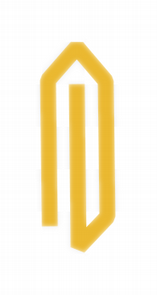
|

|

|
| Qt::BevelJoin | Qt::MiterJoin | Qt::RoundJoin |
| 常量 | 值 | 描述 |
|---|---|---|
Qt::MiterJoin
|
0x00
|
綫外部邊緣按角度延伸相交,並填充此區域。 |
Qt::BevelJoin
|
0x40
|
填充 2 綫條之間的三角形凹槽。 |
Qt::RoundJoin
|
0x80
|
填充 2 條綫之間的弧形。 |
Qt::SvgMiterJoin
|
0x100
|
斜接聯接對應的斜接聯接定義在 SVG 1.2 Tiny 規範。 |
另請參閱 QPen .
此枚舉類型定義的繪製鋼筆樣式可以用於 QPainter 。樣式包括:

|

|
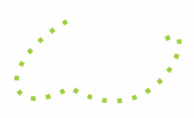
|
| Qt::SolidLine | Qt::DashLine | Qt::DotLine |
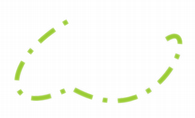
|
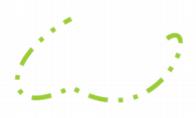
|

|
| Qt::DashDotLine | Qt::DashDotDotLine | Qt::CustomDashLine |
| 常量 | 值 | 描述 |
|---|---|---|
Qt::NoPen
|
0
|
根本沒有綫條。例如, QPainter::drawRect () 填充但不繪製任何邊界綫。 |
Qt::SolidLine
|
1
|
純綫條。 |
Qt::DashLine
|
2
|
由幾像素分隔的虛綫。 |
Qt::DotLine
|
3
|
由幾像素分隔的點。 |
Qt::DashDotLine
|
4
|
點和虛綫交替。 |
Qt::DashDotDotLine
|
5
|
1 虛綫,2 點,1 虛綫,2 點。 |
Qt::CustomDashLine
|
6
|
自定義模式的定義是使用 QPainterPathStroker::setDashPattern (). |
另請參閱 QPen .
此枚舉類型描述各種模式為 QAbstractScrollArea 的滾動條。
| 常量 | 值 | 描述 |
|---|---|---|
Qt::ScrollBarAsNeeded
|
0
|
QAbstractScrollArea 展示滾動條當要擬閤內容太大時,否則不展示。這是默認。 |
Qt::ScrollBarAlwaysOff
|
1
|
QAbstractScrollArea 從不展示滾動條。 |
Qt::ScrollBarAlwaysOn
|
2
|
QAbstractScrollArea always shows a scroll bar. |
(水平和垂直滾動條的模式是獨立的)。
對於 QEvent::Shortcut 事件的發生,快捷方式的鍵序列必須由用戶在快捷方式處於活動狀態的上下文中鍵入。可能的上下文是這些:
| 常量 | 值 | 描述 |
|---|---|---|
Qt::WidgetShortcut
|
0
|
快捷方式是活動的,當其父級 Widget 擁有聚焦時。 |
Qt::WidgetWithChildrenShortcut
|
3
|
快捷方式是活動的,當其父級 Widget (或其任何子級) 擁有聚焦時。頂層 Widget 的子級不受此快捷上下文的影響,除瞭彈齣窗口。 |
Qt::WindowShortcut
|
1
|
快捷方式是活動的,當其父級 Widget 是活動頂層窗口的邏輯子 Widget 時。 |
Qt::ApplicationShortcut
|
2
|
快捷方式是活動的,當應用程序的某個窗口活動時。 |
此枚舉用於 QGraphicsLayoutItem::sizeHint ()
| 常量 | 值 | 描述 |
|---|---|---|
Qt::MinimumSize
|
0
|
用於指定圖形布局項的最小尺寸。 |
Qt::PreferredSize
|
1
|
用於指定圖形布局項的首選尺寸。 |
Qt::MaximumSize
|
2
|
用於指定圖形布局項的最大尺寸。 |
Qt::MinimumDescent
|
3
|
用於指定圖形布局項中文本字符串的最小下降。 |
該枚舉在 Qt 4.4 引入或被修改。
另請參閱 QGraphicsLayoutItem::sizeHint ().
此枚舉用於 QPainter::drawRoundedRect () 和 QPainterPath::addRoundedRect () 函數根據指定邊界矩形的尺度,指定矩形角的半徑。
| 常量 | 值 | 描述 |
|---|---|---|
Qt::AbsoluteSize
|
0
|
使用絕對度量指定尺寸。 |
Qt::RelativeSize
|
1
|
指定相對於邊界矩形的大小,通常使用百分比度量。 |
該枚舉在 Qt 4.4 引入或被修改。
此枚舉描述如何排序 Widget 項。
| 常量 | 值 | 描述 |
|---|---|---|
Qt::AscendingOrder
|
0
|
項按升序排序,如:在 Latin-1 區域設置中以 AAA 開始以 ZZZ 結束 |
Qt::DescendingOrder
|
1
|
項按降序排序,如在 Latin-1 區域設置中以 ZZZ 開始以 AAA 結束 |
此枚舉指定應在哪裏齣現省略號,當顯示不擬閤文本時:
| 常量 | 值 | 描述 |
|---|---|---|
Qt::ElideLeft
|
0
|
省略號應齣現在文本開頭。 |
Qt::ElideRight
|
1
|
省略號應齣現在文本末尾。 |
Qt::ElideMiddle
|
2
|
省略號應齣現在文本中間。 |
Qt::ElideNone
|
3
|
省略號不應齣現在文本中。 |
Qt::ElideMiddle 通常是 URL 的最閤適選擇 (如 http://bugreports.qt.../QTWEBSITE-13/ ),而 Qt::ElideRight 適閤其它字符串 (如 " 部署應用程序在 Ma... ").
另請參閱 QAbstractItemView::textElideMode , QFontMetrics::elidedText (), AlignmentFlag ,和 QTabBar::elideMode .
此枚舉類型用於定義一些修飾符標誌。這些標誌中的某些纔有意義在打印上下文:
| 常量 | 值 | 描述 |
|---|---|---|
Qt::TextSingleLine
|
0x0100
|
將所有空白視為空格,且僅僅打印一行。 |
Qt::TextDontClip
|
0x0200
|
若不可能停留在給定邊界內,就在外側打印它。 |
Qt::TextExpandTabs
|
0x0400
|
使 U+0009 (ASCII Tab) 字符移到下一 Tab 處停止。 |
Qt::TextShowMnemonic
|
0x0800
|
將字符串 &P 顯示成 P (見 QButton for an example). For an ampersand, use "&&". |
Qt::TextWordWrap
|
0x1000
|
在適當位置斷行,如:在單詞邊界。 |
Qt::TextWrapAnywhere
|
0x2000
|
在任何地方斷行,甚至在單詞內。 |
Qt::TextHideMnemonic
|
0x8000
|
如同 Qt::TextShowMnemonic 但不繪製下劃綫。 |
Qt::TextDontPrint
|
0x4000
|
將此文本視為被隱藏且不打印它。 |
Qt::IncludeTrailingSpaces
|
TextIncludeTrailingSpaces
|
當此選項有設置時, QTextLine::naturalTextWidth () and naturalTextRect() will return a value that includes the width of trailing spaces in the text; otherwise this width is excluded. |
Qt::TextIncludeTrailingSpaces
|
0x08000000
|
Same as IncludeTrailingSpaces |
Qt::TextJustificationForced
|
0x10000
|
確保文本行兩端對齊。 |
Ensures that the longest variant is always used when computing the size of a multi-variant string. (Internal)
可以使用多個修飾符標誌如想要,除 Qt::TextSingleLine 和 Qt::TextWordWrap 無法組閤外。
不適閤給定用法的標誌通常會被忽略。
This enum is used in widgets that can display both plain text and rich text, e.g. QLabel . It is used for deciding whether a text string should be interpreted as one or the other. This is normally done by passing one of the enum values to a setTextFormat() function.
| 常量 | 值 | 描述 |
|---|---|---|
Qt::PlainText
|
0
|
文本字符串被解釋成純文本字符串。 |
Qt::RichText
|
1
|
The text string is interpreted as a rich text string. |
Qt::AutoText
|
2
|
The text string is interpreted as for Qt::RichText if Qt::mightBeRichText() returns true, otherwise as Qt::PlainText. |
Qt::LogText
|
3
|
A special, limited text format which is only used by Q3TextEdit in an optimized mode. |
此枚舉指定文本顯示 Widget,如何應答用戶輸入。
| 常量 | 值 | 描述 |
|---|---|---|
Qt::NoTextInteraction
|
0
|
不可能與文本進行交互。 |
Qt::TextSelectableByMouse
|
1
|
可以采用鼠標選擇文本,然後使用上下文菜單 (或標準鍵盤快捷鍵) 將其拷貝到剪貼闆。 |
Qt::TextSelectableByKeyboard
|
2
|
可以采用鍵盤光標鍵選擇文本。展示文本光標。 |
Qt::LinksAccessibleByMouse
|
4
|
可以采用鼠標突顯和激活鏈接。 |
Qt::LinksAccessibleByKeyboard
|
8
|
可以使用 Tab 聚焦鏈接,並采用 Enter 激活它們。 |
Qt::TextEditable
|
16
|
文本是完全可編輯的。 |
Qt::TextEditorInteraction
|
TextSelectableByMouse | TextSelectableByKeyboard | TextEditable
|
默認文本編輯器。 |
Qt::TextBrowserInteraction
|
TextSelectableByMouse | LinksAccessibleByMouse | LinksAccessibleByKeyboard
|
默認為 QTextBrowser . |
TextInteractionFlags 類型是 typedef 對於 QFlags <TextInteractionFlag>。它存儲 TextInteractionFlag 值的 OR 組閤。
此枚舉描述在繪製時如何重復或拉伸圖像部分。
| 常量 | 值 | 描述 |
|---|---|---|
Qt::StretchTile
|
0
|
比例縮放圖像以擬閤可用區域。 |
Qt::RepeatTile
|
1
|
重復圖像,直到沒有更多空間。可能裁剪最後一個圖像。 |
Qt::RoundTile
|
2
|
類似於 Repeat,但會縮小圖像,以確保不裁剪最後一個平鋪。 |
該枚舉在 Qt 4.6 引入或被修改。
| 常量 | 值 | 描述 |
|---|---|---|
Qt::LocalTime
|
0
|
Locale dependent time (Timezones and Daylight Savings Time). |
Qt::UTC
|
1
|
Coordinated Universal Time, replaces Greenwich Mean Time. |
Qt::OffsetFromUTC
|
2
|
以秒為單位的 UTC (協調世界時) 偏移。 |
| 常量 | 值 |
|---|---|
Qt::LeftToolBarArea
|
0x1
|
Qt::RightToolBarArea
|
0x2
|
Qt::TopToolBarArea
|
0x4
|
Qt::BottomToolBarArea
|
0x8
|
Qt::AllToolBarAreas
|
ToolBarArea_Mask
|
Qt::NoToolBarArea
|
0
|
ToolBarAreas 類型是 typedef 對於 QFlags <ToolBarArea>。它存儲 ToolBarArea 值的 OR 組閤。
工具按鈕的樣式,描述應如何顯示按鈕的文本和圖標。
| 常量 | 值 | 描述 |
|---|---|---|
Qt::ToolButtonIconOnly
|
0
|
隻顯示圖標。 |
Qt::ToolButtonTextOnly
|
1
|
隻顯示文本。 |
Qt::ToolButtonTextBesideIcon
|
2
|
文本齣現在圖標旁邊。 |
Qt::ToolButtonTextUnderIcon
|
3
|
文本齣現在圖標下方。 |
Qt::ToolButtonFollowStyle
|
4
|
遵循 style . |
This enum represents the state of a touch point at the time the QTouchEvent 齣現。
| 常量 | 值 | 描述 |
|---|---|---|
Qt::TouchPointPressed
|
0x01
|
觸摸點現在被按下。 |
Qt::TouchPointMoved
|
0x02
|
觸摸點移動。 |
Qt::TouchPointStationary
|
0x04
|
觸摸點不移動。 |
Qt::TouchPointReleased
|
0x08
|
觸摸點被釋放。 |
該枚舉在 Qt 4.6 引入或被修改。
TouchPointStates 類型是 typedef 對於 QFlags <TouchPointState>。它存儲 TouchPointState 值的 OR 組閤。
此枚舉類型定義圖像變換 (如比例縮放) 是否應該平滑。
| 常量 | 值 | 描述 |
|---|---|---|
Qt::FastTransformation
|
0
|
快速履行變換,沒有平滑。 |
Qt::SmoothTransformation
|
1
|
使用雙綫性過濾,變換結果圖像。 |
另請參閱 QImage::scaled ().
此枚舉描述可用 UI 效果。
默認情況下,Qt 將試著為每個效果使用特定平颱桌麵設置。使用
QApplication::setDesktopSettingsAware
() 函數 (傳遞
false
作為自變量) 以阻止這,和
QApplication::setEffectEnabled
() 以啓用或禁用特定效果。
注意:所有效果被禁用,當運行在低於 16 位顔色深度的屏幕。
| 常量 | 值 | 描述 |
|---|---|---|
Qt::UI_AnimateMenu
|
1
|
展示動畫菜單。 |
Qt::UI_FadeMenu
|
2
|
展示淡化菜單。 |
Qt::UI_AnimateCombo
|
3
|
展示動畫組閤框。 |
Qt::UI_AnimateTooltip
|
4
|
展示工具提示動畫。 |
Qt::UI_FadeTooltip
|
5
|
展示工具提示淡化效果。 |
Qt::UI_AnimateToolBox
|
6
|
預留 |
另請參閱 QApplication::setEffectEnabled () 和 QApplication::setDesktopSettingsAware ().
同義詞 Qt::WindowFlags .
此枚舉描述的空白模式類型用於 QTextDocument 類以滿足不同種類正文信息的要求。
| 常量 | 值 | 描述 |
|---|---|---|
Qt::WhiteSpaceNormal
|
0
|
用於顯示正常段落單詞換行文本的空白模式。 |
Qt::WhiteSpacePre
|
1
|
準確重現空白的預格式化文本模式。 |
Qt::WhiteSpaceNoWrap
|
2
|
This enum is defined in the
<QTextDocument>
頭文件。
此枚舉類型用於指定各種 Widget 屬性。設置和清零屬性采用 QWidget::setAttribute (),和查詢采用 QWidget::testAttribute (),盡管有些擁有如下所述的特彆方便功能。
| 常量 | 值 | 描述 |
|---|---|---|
Qt::WA_AcceptDrops
|
78
|
允許來自拖放操作的數據掉落到 Widget (見 QWidget::setAcceptDrops ()). |
Qt::WA_AlwaysShowToolTips
|
84
|
為不活動窗口啓用工具提示。 |
Qt::WA_ContentsPropagated
|
3
|
此標誌多餘且過時;不再有任何效果。從 Qt 4.1 起,未設置 WA_PaintOnScreen 的所有 Widget 會傳播其內容。 |
Qt::WA_CustomWhatsThis
|
47
|
指示 Widget 想要在 What's This? 模式下繼續正常運轉。這由 Widget 作者設置。 |
Qt::WA_DeleteOnClose
|
55
|
使 Qt 刪除此 Widget 當小部件接受關閉事件時 (見 QWidget::closeEvent ()). |
Qt::WA_Disabled
|
0
|
指示 Widget 被禁用 (即:不接收任何鼠標/鍵盤事件)。還有 Getter 函數 QWidget::isEnabled ()。這由 Qt 內核設置 (或清零)。 |
Qt::WA_DontShowOnScreen
|
103
|
指示 Widget 被隱藏 (或不屬於可查看桌麵)。 |
Qt::WA_ForceDisabled
|
32
|
Indicates that the widget is explicitly disabled, i.e. it will remain disabled even when all its ancestors are set to the enabled state. This implies WA_Disabled. This is set/cleared by QWidget::setEnabled () 和 QWidget::setDisabled (). |
Qt::WA_ForceUpdatesDisabled
|
59
|
Indicates that updates are explicitly disabled for the widget; i.e. it will remain disabled even when all its ancestors are set to the updates-enabled state. This implies WA_UpdatesDisabled. This is set/cleared by QWidget::setUpdatesEnabled (). |
Qt::WA_GroupLeader
|
72
|
此屬性已棄用。 使用 QWidget::windowModality 代替。 |
Qt::WA_Hover
|
74
|
強製 Qt 生成描繪事件,當鼠標進入或離開 Widget 時。通常使用此特徵,當實現自定義樣式時;見 樣式 範例瞭解細節。 |
Qt::WA_InputMethodEnabled
|
14
|
Enables input methods for Asian languages. Must be set when creating custom text editing widgets. On Windows CE and Symbian this flag can be used in addition to QApplication::autoSipEnabled to automatically display the SIP when entering a widget. |
Qt::WA_KeyboardFocusChange
|
77
|
設置頂層窗口,當用戶采用鍵盤 (Tab、BackTab 或快捷鍵) 更改聚焦時。 |
Qt::WA_KeyCompression
|
33
|
啓用鍵事件壓縮,若有設置;否則禁用,若未設置。默認情況下,鍵壓縮是關閉的,因此每次按鍵 (或更多,因為自動重復通常是打開的) Widget 隻接收 1 個鍵事件。若打開,而程序卻跟不上鍵輸入,Qt 可能試著去壓縮鍵事件,以便在每個事件中可以處理多個字符。例如:單詞處理程序 Widget 可能接收 2、3 或更多字符,在各 QKeyEvent::text (), if the layout recalculation takes too long for the CPU. If a widget supports multiple character unicode input, it is always safe to turn the compression on. Qt performs key event compression only for printable characters. Qt::Modifier keys, cursor movement keys, function keys and miscellaneous action keys (e.g. Escape, Enter, Backspace, PrintScreen) will stop key event compression, even if there are more compressible key events available. Platforms other than Mac and X11 do not support this compression, in which case turning it on will have no effect. This is set/cleared by the widget's author. |
Qt::WA_LayoutOnEntireRect
|
48
|
指示 Widget 想要 QLayout 要運轉於整個 QWidget::rect (),不僅在 QWidget::contentsRect ()。這是由 Widget 作者設置的。 |
Qt::WA_LayoutUsesWidgetRect
|
92
|
Ignore the layout item rect from the style when laying out this widget with QLayout . This makes a difference in QMacStyle and QPlastiqueStyle for some widgets. |
Qt::WA_MacNoClickThrough
|
12
|
When a widget that has this attribute set is clicked, and its window is inactive, the click will make the window active but won't be seen by the widget. Typical use of this attribute is on widgets with "destructive" actions, such as a "Delete" button. WA_MacNoClickThrough also applies to all child widgets of the widget that has it set. |
Qt::WA_MacOpaqueSizeGrip
|
85
|
Indicates that the native Carbon size grip should be opaque instead of transparent (the default). This attribute is only applicable to Mac OS X and is set by the widget's author. |
Qt::WA_MacShowFocusRect
|
88
|
Indicates that this widget should get a QFocusFrame around it. Some widgets draw their own focus halo regardless of this attribute. Not that the QWidget::focusPolicy also plays the main role in whether something is given focus or not, this only controls whether or not this gets the focus frame. This attribute is only applicable to Mac OS X. |
Qt::WA_MacNormalSize
|
89
|
Indicates the widget should have the normal size for widgets in Mac OS X. This attribute is only applicable to Mac OS X. |
Qt::WA_MacSmallSize
|
90
|
Indicates the widget should have the small size for widgets in Mac OS X. This attribute is only applicable to Mac OS X. |
Qt::WA_MacMiniSize
|
91
|
Indicates the widget should have the mini size for widgets in Mac OS X. This attribute is only applicable to Mac OS X. |
Qt::WA_MacVariableSize
|
102
|
Indicates the widget can choose between alternative sizes for widgets to avoid clipping. This attribute is only applicable to Mac OS X. |
Qt::WA_MacBrushedMetal
|
46
|
Indicates the widget should be drawn in the brushed metal style as supported by the windowing system. This attribute is only applicable to Mac OS X. |
Qt::WA_Mapped
|
11
|
指示 Widget 已映射到屏幕。這由 Qt 內核設置/清零。 |
Qt::WA_MouseNoMask
|
71
|
Makes the widget receive mouse events for the entire widget regardless of the currently set mask, overriding QWidget::setMask (). This is not applicable for top-level windows. |
Qt::WA_MouseTracking
|
2
|
指示 Widget 有啓用鼠標追蹤。見 QWidget::mouseTracking . |
Qt::WA_Moved
|
43
|
指示 Widget 擁有明確位置。這的設置/清零通過 QWidget::move () 和通過 QWidget::setGeometry (). |
Qt::WA_MSWindowsUseDirect3D
|
94
|
此值已過時且不起作用。 |
Qt::WA_NoBackground
|
WA_OpaquePaintEvent
|
此值已過時。使用 WA_OpaquePaintEvent 代替。 |
Qt::WA_NoChildEventsForParent
|
58
|
Indicates that the widget does not want ChildAdded or ChildRemoved events sent to its parent. This is rarely necessary but can help to avoid automatic insertion widgets like splitters and layouts. This is set by a widget's author. |
Qt::WA_NoChildEventsFromChildren
|
39
|
Indicates that the widget does not want to receive ChildAdded or ChildRemoved events sent from its children. This is set by a widget's author. |
Qt::WA_NoMouseReplay
|
54
|
Used for pop-up widgets. Indicates that the most recent mouse press event should not be replayed when the pop-up widget closes. The flag is set by the widget's author and cleared by the Qt kernel every time the widget receives a new mouse event. |
Qt::WA_NoMousePropagation
|
73
|
禁止將鼠標事件傳播給 Widget 父級。此屬性默認禁用。 |
Qt::WA_TransparentForMouseEvents
|
51
|
When enabled, this attribute disables the delivery of mouse events to the widget and its children. Mouse events are delivered to other widgets as if the widget and its children were not present in the widget hierarchy; mouse clicks and other events effectively "pass through" them. This attribute is disabled by default. |
Qt::WA_NoSystemBackground
|
9
|
指示 Widget 沒有背景 (即:當 Widget 接收描繪事件時,不自動重新繪製背景)。 |
注意: Unlike WA_OpaquePaintEvent, newly exposed areas are never 填充背景 (如:在首次展示窗口後,用戶可以看穿它,直到應用程序處理描繪事件為止)。此標誌由 Widget 作者設置或清零。
| 常量 | 值 | 描述 |
|---|---|---|
Qt::WA_OpaquePaintEvent
|
4
|
指示 Widget 描繪其所有像素,當它接收描繪事件時。因此,不需要采用 (像更新、重置大小、捲動及聚焦改變的) 操作擦除 Widget,在生成描繪事件之前。使用 WA_OpaquePaintEvent 提供小的優化,通過幫助縮減在不支持雙緩衝的係統上的閃爍,並在描繪之前避免擦除背景必要的計算周期。 |
注意: Unlike WA_NoSystemBackground, WA_OpaquePaintEvent makes an effort to avoid transparent window backgrounds. This flag is set or cleared by the widget's author.
| 常量 | 值 | 描述 |
|---|---|---|
Qt::WA_OutsideWSRange
|
49
|
Indicates that the widget is outside the valid range of the window system's coordinate system. A widget outside the valid range cannot be mapped on screen. This is set/cleared by the Qt kernel. |
Qt::WA_PaintOnScreen
|
8
|
指示 Widget 想要直接繪製到屏幕中。具有此屬性設置的 Widget 不參與閤成管理 (即:它們不可以半透明或透過半透明重疊 Widget 照射)。 |
注意: This flag is only supported on X11 and it disables double buffering. On Qt for Embedded Linux, the flag only works when set on a top-level widget and it relies on support from the active screen driver. This flag is set or cleared by the widget's author. To render outside of Qt's paint system, e.g., if you require native painting primitives, you need to reimplement QWidget::paintEngine () 以返迴 0 並設置此標誌。
| 常量 | 值 | 描述 |
|---|---|---|
Qt::WA_PaintOutsidePaintEvent
|
13
|
Makes it possible to use QPainter to paint on the widget outside paintEvent() . This flag is not supported on Windows, Mac OS X or Embedded Linux. We recommend that you use it only when porting Qt 3 code to Qt 4. |
Qt::WA_PaintUnclipped
|
52
|
使不裁剪此 Widget 中的所有描繪器操作。此 Widget 或在其前麵的其它小部件的子級不會裁剪描繪器可以在其中描繪的區域。此標誌僅支持有設置 WA_PaintOnScreen 標誌的 Widget。以跨平颱方式做到這的首選辦法,是創建位於其它 Widget 前麵的透明小部件。 |
Qt::WA_PendingMoveEvent
|
34
|
指示移動事件待決 (如:隱藏 Widget 被移動時)。此標誌的設置 (或清零) 是通過 Qt 內核。 |
Qt::WA_PendingResizeEvent
|
35
|
指示重置大小事件待決 (如:隱藏 Widget 被重置大小時)。此標誌的設置 (或清零) 是通過 Qt 內核。 |
Qt::WA_QuitOnClose
|
76
|
Makes Qt quit the application when the last widget with the attribute set has accepted closeEvent(). This behavior can be modified with the QApplication::quitOnLastWindowClosed 特性。默認情況下,有設置此屬性當 Widget 類型為 Qt::Window . |
Qt::WA_Resized
|
42
|
指示 Widget 擁有明確大小。此標誌的設置 (或清零) 是通過 QWidget::resize () 和 QWidget::setGeometry (). |
Qt::WA_RightToLeft
|
56
|
指示 Widget 的布局方嚮是從右到左。 |
Qt::WA_SetCursor
|
38
|
指示 Widget 擁有其自己的光標。此標誌的設置 (或清零) 是通過 QWidget::setCursor () 和 QWidget::unsetCursor (). |
Qt::WA_SetFont
|
37
|
指示 Widget 擁有其自己的字體。此標誌的設置 (或清零) 是通過 QWidget::setFont (). |
Qt::WA_SetPalette
|
36
|
指示 Widget 擁有其自己的調色闆。此標誌的設置 (或清零) 是通過 QWidget::setPalette (). |
Qt::WA_SetStyle
|
86
|
指示 Widget 擁有其自己的樣式。此標誌的設置 (或清零) 是通過 QWidget::setStyle (). |
Qt::WA_ShowModal
|
70
|
此屬性已棄用。 使用 QWidget::windowModality 代替。 |
Qt::WA_StaticContents
|
5
|
指示 Widget 內容西北對齊且靜態。當重置大小時,這種 Widget 隻接收自身新近可見部分的描繪事件。此標誌由 Widget 作者設置或清零。 |
Qt::WA_StyleSheet
|
97
|
指示 Widget 的樣式化是使用 樣式錶 . |
Qt::WA_TranslucentBackground
|
120
|
指示 Widget 應該擁有半透明背景,即:Widget 任何不透明區域會半透明,因為 Widget 將擁有 Alpha 通道。設置此標誌導緻要設置 WA_NoSystemBackground。在 Windows 小部件還需要 Qt::FramelessWindowHint 窗口標誌被設置。此標誌由 Widget 的作者設置或清零。 |
Qt::WA_UnderMouse
|
1
|
Indicates that the widget is under the mouse cursor. The value is not updated correctly during drag and drop operations. There is also a getter function, QWidget::underMouse (). This flag is set or cleared by the Qt kernel. |
Qt::WA_UpdatesDisabled
|
10
|
Indicates that updates are blocked (including the system background). This flag is set or cleared by the Qt kernel. |
警告: This flag must never be set or cleared by the widget's author.
| 常量 | 值 | 描述 |
|---|---|---|
Qt::WA_WindowModified
|
41
|
Indicates that the window is marked as modified. On some platforms this flag will do nothing, on others (including Mac OS X and Windows) the window will take a modified appearance. This flag is set or cleared by QWidget::setWindowModified (). |
Qt::WA_WindowPropagation
|
80
|
Makes a toplevel window inherit font and palette from its parent. |
Qt::WA_MacAlwaysShowToolWindow
|
96
|
On Mac OS X, show the tool window even when the application is not active. By default, all tool windows are hidden when the application is inactive. |
Qt::WA_SetLocale
|
87
|
指示區域設置應考慮 Widget 注意事項。 |
Qt::WA_StyledBackground
|
93
|
指示應使用樣式化背景繪製 Widget。 |
Qt::WA_ShowWithoutActivating
|
98
|
不使之活動展示 Widget。 |
Qt::WA_NativeWindow
|
100
|
Indicates that a native window is created for the widget. Enabling this flag will also force a native window for the widget's ancestors unless Qt::WA_DontCreateNativeAncestors is set. |
Qt::WA_DontCreateNativeAncestors
|
101
|
Indicates that the widget's ancestors are kept non-native even though the widget itself is native. |
Qt::WA_X11NetWmWindowTypeDesktop
|
104
|
Adds _NET_WM_WINDOW_TYPE_DESKTOP to the window's _NET_WM_WINDOW_TYPE X11 window property. See http://standards.freedesktop.org/wm-spec/ for more details. This attribute has no effect on non-X11 platforms. |
Qt::WA_X11NetWmWindowTypeDock
|
105
|
Adds _NET_WM_WINDOW_TYPE_DOCK to the window's _NET_WM_WINDOW_TYPE X11 window property. See http://standards.freedesktop.org/wm-spec/ for more details. This attribute has no effect on non-X11 platforms. |
Qt::WA_X11NetWmWindowTypeToolBar
|
106
|
Adds _NET_WM_WINDOW_TYPE_TOOLBAR to the window's _NET_WM_WINDOW_TYPE X11 window property. See http://standards.freedesktop.org/wm-spec/ for more details. This attribute has no effect on non-X11 platforms. |
注意: Qt automaticaly sets this attribute for QToolBar .
| 常量 | 值 | 描述 |
|---|---|---|
Qt::WA_X11NetWmWindowTypeMenu
|
107
|
Adds _NET_WM_WINDOW_TYPE_MENU to the window's _NET_WM_WINDOW_TYPE X11 window property. See http://standards.freedesktop.org/wm-spec/ for more details. This attribute has no effect on non-X11 platforms. |
注意: Qt automatically sets this attribute for QMenu when torn-off.
| 常量 | 值 | 描述 |
|---|---|---|
Qt::WA_X11NetWmWindowTypeUtility
|
108
|
Adds _NET_WM_WINDOW_TYPE_UTILITY to the window's _NET_WM_WINDOW_TYPE X11 window property. See http://standards.freedesktop.org/wm-spec/ for more details. This attribute has no effect on non-X11 platforms. |
注意: Qt automatically sets this attribute for the Qt::Tool 窗口類型。
| 常量 | 值 | 描述 |
|---|---|---|
Qt::WA_X11NetWmWindowTypeSplash
|
109
|
Adds _NET_WM_WINDOW_TYPE_SPLASH to the window's _NET_WM_WINDOW_TYPE X11 window property. See http://standards.freedesktop.org/wm-spec/ for more details. This attribute has no effect on non-X11 platforms. |
注意: Qt automatically sets this attribute for the Qt::SplashScreen 窗口類型。
| 常量 | 值 | 描述 |
|---|---|---|
Qt::WA_X11NetWmWindowTypeDialog
|
110
|
Adds _NET_WM_WINDOW_TYPE_DIALOG to the window's _NET_WM_WINDOW_TYPE X11 window property. See http://standards.freedesktop.org/wm-spec/ for more details. This attribute has no effect on non-X11 platforms. |
注意: Qt automatically sets this attribute for the Qt::Dialog and Qt::Sheet 窗口類型。
| 常量 | 值 | 描述 |
|---|---|---|
Qt::WA_X11NetWmWindowTypeDropDownMenu
|
111
|
Adds _NET_WM_WINDOW_TYPE_DROPDOWN_MENU to the window's _NET_WM_WINDOW_TYPE X11 window property. See http://standards.freedesktop.org/wm-spec/ for more details. This attribute has no effect on non-X11 platforms. |
注意: Qt automatically sets this attribute for QMenus added to a QMenuBar .
| 常量 | 值 | 描述 |
|---|---|---|
Qt::WA_X11NetWmWindowTypePopupMenu
|
112
|
Adds _NET_WM_WINDOW_TYPE_POPUP_MENU to the window's _NET_WM_WINDOW_TYPE X11 window property. See http://standards.freedesktop.org/wm-spec/ for more details. This attribute has no effect on non-X11 platforms. |
注意: Qt automatically sets this attribute for QMenu .
| 常量 | 值 | 描述 |
|---|---|---|
Qt::WA_X11NetWmWindowTypeToolTip
|
113
|
Adds _NET_WM_WINDOW_TYPE_TOOLTIP to the window's _NET_WM_WINDOW_TYPE X11 window property. See http://standards.freedesktop.org/wm-spec/ for more details. This attribute has no effect on non-X11 platforms. |
注意: Qt automatically sets this attribute for the Qt::ToolTip 窗口類型。
| 常量 | 值 | 描述 |
|---|---|---|
Qt::WA_X11NetWmWindowTypeNotification
|
114
|
Adds _NET_WM_WINDOW_TYPE_NOTIFICATION to the window's _NET_WM_WINDOW_TYPE X11 window property. See http://standards.freedesktop.org/wm-spec/ for more details. This attribute has no effect on non-X11 platforms. |
Qt::WA_X11NetWmWindowTypeCombo
|
115
|
Adds _NET_WM_WINDOW_TYPE_COMBO to the window's _NET_WM_WINDOW_TYPE X11 window property. See http://standards.freedesktop.org/wm-spec/ for more details. This attribute has no effect on non-X11 platforms. |
注意: Qt automatically sets this attribute for the QComboBox pop-up.
| 常量 | 值 | 描述 |
|---|---|---|
Qt::WA_X11NetWmWindowTypeDND
|
116
|
Adds _NET_WM_WINDOW_TYPE_DND to the window's _NET_WM_WINDOW_TYPE X11 window property. See http://standards.freedesktop.org/wm-spec/ for more details. This attribute has no effect on non-X11 platforms. |
注意: Qt automatically sets this attribute on the feedback widget used during a drag.
| 常量 | 值 | 描述 |
|---|---|---|
Qt::WA_MacFrameworkScaled
|
117
|
Enables resolution independence aware mode on Mac when using Carbon. This attribute has no effect on Cocoa. The attribute is off by default and can be enabled on a per-window basis. |
Qt::WA_AcceptTouchEvents
|
121
|
允許觸摸事件 (見 QTouchEvent ) 發送給 Widget。必須在可以處理觸摸事件的所有 Widget 中設置。不設置此屬性,來自觸摸設備的事件將作為鼠標事件被發送。 |
Qt::WA_TouchPadAcceptSingleTouchEvents
|
123
|
允許將觸摸闆單觸摸事件發送給 Widget。 |
Qt::WA_MergeSoftkeys
|
124
|
Allows widget to merge softkeys with parent widget, i.e. widget can set only one softkeys and request softkey implementation to take rest of the softkeys from the parent. Note parents are traversed until WA_MergeSoftkeys is not set. See also Qt::WA_MergeSoftkeysRecursively This attribute currently has effect only on Symbian platforms |
Qt::WA_MergeSoftkeysRecursively
|
125
|
Allows widget to merge softkeys recursively with all parents. If this attribute is set, the widget parents are traversed until window boundary (widget without parent or dialog) is found. This attribute currently has effect only on Symbian platforms |
Qt::WA_X11DoNotAcceptFocus
|
132
|
Asks the window manager to not give focus to this top level window. This attribute has no effect on non-X11 platforms. |
Qt::WA_LockPortraitOrientation
|
128
|
Locks the widget to a portrait orientation, ignoring changes to the display's orientation with respect to the user. |
Qt::WA_LockLandscapeOrientation
|
129
|
Locks the widget to a landscape orientation, ignoring changes to the display's orientation with respect to the user. |
Qt::WA_AutoOrientation
|
130
|
Causes the widget to change orientation whenever the display changes orientation with respect to the user. |
Qt::WA_MacNoShadow
|
134
|
Since Qt 4.8, this attribute disables drop shadows for this top level window. Only affects Cocoa builds of Qt for Mac OS X. |
此枚舉用於描述窗口框架的各部分。它的返迴是通過 QGraphicsWidget::windowFrameSectionAt () 描述窗口框架的什麼部分在鼠標下。
| 常量 | 值 |
|---|---|
Qt::NoSection
|
0
|
Qt::LeftSection
|
1
|
Qt::TopLeftSection
|
2
|
Qt::TopSection
|
3
|
Qt::TopRightSection
|
4
|
Qt::RightSection
|
5
|
Qt::BottomRightSection
|
6
|
Qt::BottomSection
|
7
|
Qt::BottomLeftSection
|
8
|
Qt::TitleBarArea
|
9
|
該枚舉在 Qt 4.4 引入或被修改。
另請參閱 QGraphicsWidget::windowFrameEvent (), QGraphicsWidget::paintWindowFrame (),和 QGraphicsWidget::windowFrameSectionAt ().
此枚舉指定模態窗口的行為。模態窗口是阻塞輸入到其它窗口的一種窗口。注意:模態窗口的子級窗口不會阻塞。
值是:
| 常量 | 值 | 描述 |
|---|---|---|
Qt::NonModal
|
0
|
窗口非模態,且不阻塞對其它窗口的輸入。 |
Qt::WindowModal
|
1
|
窗口對單個窗口層次結構是模態的,並阻塞其父級窗口、所有祖父級窗口,及其父級窗口和祖父級窗口的所有同級窗口的輸入。 |
Qt::ApplicationModal
|
2
|
窗口對應用程序是模態的,且會阻塞所有窗口的輸入。 |
另請參閱 QWidget::windowModality and QDialog .
此枚舉類型用於指定頂層窗口的當前狀態。
狀態是
| 常量 | 值 | 描述 |
|---|---|---|
Qt::WindowNoState
|
0x00000000
|
窗口不擁有狀態設置 (在正常狀態下)。 |
Qt::WindowMinimized
|
0x00000001
|
窗口被最小化 (即:圖標化)。 |
Qt::WindowMaximized
|
0x00000002
|
最大化具有圍繞它的框架的窗口。 |
Qt::WindowFullScreen
|
0x00000004
|
窗口填充整個屏幕,沒有任何框架圍繞它。 |
Qt::WindowActive
|
0x00000008
|
窗口是活動窗口,即:它擁有鍵盤聚焦。 |
WindowStates 類型是 typedef 對於 QFlags <WindowState>。它存儲 WindowState 值的 OR 組閤。
此枚舉類型用於為 Widget 指定各種窗口係統特性。它們相當不尋常,但在某些情況下是必要的。其中一些標誌從屬底層窗口管理器是否支持它們。
主要類型是
| 常量 | 值 | 描述 |
|---|---|---|
Qt::Widget
|
0x00000000
|
這是默認類型對於 QWidget 。此類型的 Widget 為子級小部件若它們擁有父級,和為獨立窗口若它們沒有父級。另請參閱 Qt::Window 和 Qt::SubWindow。 |
Qt::Window
|
0x00000001
|
指示 Widget 通常是具有窗口係統框架和標題欄的窗口,不管小部件是否有父級。注意,不可能取消設置此標誌,若 Widget 沒有父級。 |
Qt::Dialog
|
0x00000002 | Window
|
指示 Widget 是應被裝飾成對話框的窗口 (即:標題欄中通常沒有最大化或最小化按鈕)。這是默認類型對於 QDialog 。若想要將它用作模態對話框,發起它應該是從另一窗口,或擁有父級且使用具有 QWidget::windowModality 特性。若使之模態化,對話框將阻止應用程序的其它頂層窗口獲得任何輸入。擁有父級的頂層窗口稱為 secondary 窗口。 |
Qt::Sheet
|
0x00000004 | Window
|
Indicates that the window is a Macintosh sheet. Since using a sheet implies window modality, the recommended way is to use QWidget::setWindowModality (),或 QDialog::open (),代替。 |
Qt::Drawer
|
0x00000006 | Window
|
Indicates that the widget is a Macintosh drawer. |
Qt::Popup
|
0x00000008 | Window
|
指示 Widget 是彈齣頂層窗口 (即:它是模態的),但擁有適閤彈齣菜單的窗口係統框架。 |
Qt::Tool
|
0x0000000a | Window
|
Indicates that the widget is a tool window. A tool window is often a small window with a smaller than usual title bar and decoration, typically used for collections of tool buttons. If there is a parent, the tool window will always be kept on top of it. If there isn't a parent, you may consider using Qt::WindowStaysOnTopHint as well. If the window system supports it, a tool window can be decorated with a somewhat lighter frame. It can also be combined with Qt::FramelessWindowHint.
On Mac OS X, tool windows correspond to the Floating class of windows. This means that the window lives on a level above normal windows; it impossible to put a normal window on top of it. By default, tool windows will disappear when the application is inactive. This can be controlled by the Qt::WA_MacAlwaysShowToolWindow 屬性。 |
Qt::ToolTip
|
0x0000000c | Window
|
指示 Widget 是工具提示。這在內部使用以實現 tooltips . |
Qt::SplashScreen
|
0x0000000e | Window
|
指示窗口是閃屏。這是默認類型對於 QSplashScreen . |
Qt::Desktop
|
0x00000010 | Window
|
指示此 Widget 是桌麵。這是類型為 QDesktopWidget . |
Qt::SubWindow
|
0x00000012
|
指示此 Widget 是子窗口,譬如 QMdiSubWindow 小部件。 |
還有很多標誌可以用於定製頂層窗口外觀。這些對其它窗口不起作用:
| 常量 | 值 | 描述 |
|---|---|---|
Qt::MSWindowsFixedSizeDialogHint
|
0x00000100
|
在 Windows 賦予窗口很薄的對話框邊框。此樣式傳統上用於固定大小的對話框。 |
Qt::MSWindowsOwnDC
|
0x00000200
|
在 Windows 賦予窗口自身顯示上下文。 |
Qt::X11BypassWindowManagerHint
|
0x00000400
|
完全繞過窗口管理器。這導緻根本不受管理的無邊界窗口 (即,無鍵盤輸入除非調用 QWidget::activateWindow () 手動)。 |
Qt::FramelessWindowHint
|
0x00000800
|
産生無邊框窗口。用戶無法憑藉窗口係統移動無邊框窗口或重置大小。在 X11,標誌結果從屬窗口管理器及其理解 Motif 和/或 NETWM 提示的能力。大多數現有的現代窗口管理器都可以處理這。 |
The
CustomizeWindowHint
標誌用於啓用窗口控件的定製。必須設置此標誌以允許
WindowTitleHint
,
WindowSystemMenuHint
,
WindowMinimizeButtonHint
,
WindowMaximizeButtonHint
and
WindowCloseButtonHint
標誌的改變。
| 常量 | 值 | 描述 |
|---|---|---|
Qt::CustomizeWindowHint
|
0x02000000
|
關閉默認窗口標題提示。 |
Qt::WindowTitleHint
|
0x00001000
|
賦予窗口標題欄。 |
Qt::WindowSystemMenuHint
|
0x00002000
|
添加窗口係統菜單,可能還有關閉按鈕 (例如在 Mac)。若需要隱藏 (或展示) 關閉按鈕,更可移植是使用
WindowCloseButtonHint
.
|
Qt::WindowMinimizeButtonHint
|
0x00004000
|
添加最小化按鈕。在某些平颱,為瞭它能工作這隱含 Qt:WindowSystemMenuHint。 |
Qt::WindowMaximizeButtonHint
|
0x00008000
|
添加最大化按鈕。在某些平颱,為瞭它能工作這隱含 Qt:WindowSystemMenuHint。 |
Qt::WindowMinMaxButtonsHint
|
WindowMinimizeButtonHint | WindowMaximizeButtonHint
|
添加最小化和最大化按鈕。在某些平颱,為瞭它能工作這隱含 Qt:WindowSystemMenuHint。 |
Qt::WindowCloseButtonHint
|
0x08000000
|
添加關閉按鈕。在某些平颱,為瞭它能工作這隱含 Qt:WindowSystemMenuHint。 |
Qt::WindowContextHelpButtonHint
|
0x00010000
|
將上下文幫助按鈕添加到對話框。 在某些平颱,為瞭它能工作這隱含 Qt:WindowSystemMenuHint。 |
Qt::MacWindowToolBarButtonHint
|
0x10000000
|
On Mac OS X adds a tool bar button (i.e., the oblong button that is on the top right of windows that have toolbars). |
Qt::BypassGraphicsProxyWidget
|
0x20000000
|
阻止窗口及其子級自動將自身嵌入 QGraphicsProxyWidget 若父級 Widget 已嵌入。可以設置此標誌若想要 Widget 始終是桌麵頂層小部件,不管父級 Widget 是否嵌入場景。 |
Qt::WindowShadeButtonHint
|
0x00020000
|
|
Qt::WindowStaysOnTopHint
|
0x00040000
|
告知窗口係統窗口應停留在所有其它窗口之上。注意:在某些 X11 窗口管理器中,還必須傳遞 Qt::X11BypassWindowManagerHint 為此標誌能正確工作。 |
Qt::WindowStaysOnBottomHint
|
0x04000000
|
Informs the window system that the window should stay on bottom of all other windows. Note that on X11 this hint will work only in window managers that support _NET_WM_STATE_BELOW atom. If a window always on the bottom has a parent, the parent will also be left on the bottom. This window hint is currently not implemented for Mac OS X. |
Qt::WindowOkButtonHint
|
0x00080000
|
Adds an OK button to the window decoration of a dialog. Only supported for Windows CE. |
Qt::WindowCancelButtonHint
|
0x00100000
|
Adds a Cancel button to the window decoration of a dialog. Only supported for Windows CE. |
Qt::WindowSoftkeysVisibleHint
|
0x40000000
|
Makes softkeys visible when widget is fullscreen. Only supported for Symbian. |
Qt::WindowSoftkeysRespondHint
|
0x80000000
|
Makes softkeys to receive key events even when invisible. With this hint the softkey actions are triggered even the softkeys are invisible i.e. the window is displayed with
showFullscreen()
. Only supported for Symbian.
|
Qt::WindowType_Mask
|
0x000000ff
|
用於提取窗口標誌的窗口類型部分的掩碼。 |
Obsolete flags:
| 常量 | 值 | 描述 |
|---|---|---|
Qt::WMouseNoMask
|
0x00080000
|
使用 Qt::WA_MouseNoMask 代替。 |
Qt::WDestructiveClose
|
0x00100000
|
使用 Qt::WA_DeleteOnClose 代替。 |
Qt::WStaticContents
|
0x00200000
|
使用 Qt::WA_StaticContents 代替。 |
Qt::WGroupLeader
|
0x00400000
|
No longer needed. |
Qt::WShowModal
|
0x00800000
|
使用 QWidget::windowModality 代替。 |
Qt::WNoMousePropagation
|
0x01000000
|
使用 Qt::WA_NoMousePropagation 代替。 |
Qt::WType_TopLevel
|
Window
|
Use Qt::Window instead. |
Qt::WType_Dialog
|
Dialog
|
Use Qt::Dialog instead. |
Qt::WType_Popup
|
Popup
|
Use Qt::Popup instead. |
Qt::WType_Desktop
|
桌麵
|
Use Qt::Desktop instead. |
Qt::WType_Mask
|
WindowType_Mask
|
Use Qt::WindowType_Mask instead. |
Qt::WStyle_Customize
|
0
|
No longer needed. |
Qt::WStyle_NormalBorder
|
0
|
No longer needed. |
Qt::WStyle_DialogBorder
|
MSWindowsFixedSizeDialogHint
|
Use Qt::MSWindowsFixedSizeDialogHint instead. |
Qt::WStyle_NoBorder
|
FramelessWindowHint
|
Use Qt::FramelessWindowHint instead. |
Qt::WStyle_Title
|
WindowTitleHint
|
Use Qt::WindowTitleHint instead. |
Qt::WStyle_SysMenu
|
WindowSystemMenuHint
|
Use Qt::WindowSystemMenuHint instead. |
Qt::WStyle_Minimize
|
WindowMinimizeButtonHint
|
Use Qt::WindowMinimizeButtonHint instead. |
Qt::WStyle_Maximize
|
WindowMaximizeButtonHint
|
Use Qt::WindowMaximizeButtonHint instead. |
Qt::WStyle_MinMax
|
WStyle_Minimize | WStyle_Maximize
|
Use Qt::WindowMinMaxButtonsHint instead. |
Qt::WStyle_Tool
|
工具
|
Use Qt::Tool instead. |
Qt::WStyle_StaysOnTop
|
WindowStaysOnTopHint
|
Use Qt::WindowStaysOnTopHint instead. |
Qt::WStyle_ContextHelp
|
WindowContextHelpButtonHint
|
Use Qt::WindowContextHelpButtonHint instead. |
Qt::WPaintDesktop
|
0
|
No longer needed. |
Qt::WPaintClever
|
0
|
No longer needed. |
Qt::WX11BypassWM
|
X11BypassWindowManagerHint
|
Use Qt::X11BypassWindowManagerHint instead. |
Qt::WWinOwnDC
|
MSWindowsOwnDC
|
Use Qt::MSWindowsOwnDC instead. |
Qt::WMacSheet
|
Sheet
|
Use Qt::Sheet instead. |
Qt::WMacDrawer
|
Drawer
|
Use Qt::Drawer instead. |
Qt::WStyle_Splash
|
SplashScreen
|
Use Qt::SplashScreen instead. |
Qt::WNoAutoErase
|
0
|
No longer needed. |
Qt::WRepaintNoErase
|
0
|
No longer needed. |
Qt::WNorthWestGravity
|
WStaticContents
|
使用 Qt::WA_StaticContents 代替。 |
Qt::WType_Modal
|
Dialog | WShowModal
|
Use Qt::Dialog and QWidget::windowModality 代替。 |
Qt::WStyle_Dialog
|
Dialog
|
Use Qt::Dialog instead. |
Qt::WStyle_NoBorderEx
|
FramelessWindowHint
|
Use Qt::FramelessWindowHint instead. |
Qt::WResizeNoErase
|
0
|
No longer needed. |
Qt::WMacNoSheet
|
0
|
No longer needed. |
WindowFlags 類型是 typedef 對於 QFlags <WindowType>。它存儲 WindowType 值的 OR 組閤。
另請參閱 QWidget::windowFlags and 窗口標誌範例 .
轉換純文本字符串 plain 到 HTML 格式段落,同時保留其大部分外觀。
mode 定義如何處理空白。
此函數的定義在
<QTextDocument>
頭文件。
另請參閱 escape () 和 mightBeRichText ().
轉換純文本字符串
plain
to a HTML string with HTML metacharacters
<
,
>
,
&
,和
"
replaced by HTML entities.
範例:
QString plain = "#include <QtCore>"
QString html = Qt::escape(plain);
// html == "#include <QtCore>"
此函數的定義在
<QTextDocument>
頭文件。
另請參閱 convertFromPlainText () 和 mightBeRichText ().
Returns true if the string text is likely to be rich text; otherwise returns false.
該函數使用快速,因此會簡單試探。它主要校驗第一換行符之前,是否存在看起來像標記的東西。盡管對於常見情況,結果可能是正確的,但不保證。
此函數的定義在
<QTextDocument>
頭文件。
