Threads are about doing things in parallel, just like processes. So how do threads differ from processes? While you are making calculations on a spreadsheet, there may also be a media player running on the same desktop playing your favorite song. Here is an example of two processes working in parallel: one running the spreadsheet program; one running a media player. Multitasking is a well known term for this. A closer look at the media player reveals that there are again things going on in parallel within one single process. While the media player is sending music to the audio driver, the user interface with all its bells and whistles is being constantly updated. This is what threads are for — concurrency within one single process.
那麼,如何實現並發呢?在單核 CPU 上並行工作是一種錯覺,有點類似於電影中移動圖像的錯覺。對於進程,錯覺是在很短時間後中斷處理器在一進程中的工作而産生的。然後,處理器繼續處理下一進程。為在進程之間切換,保存當前程序計數器,並加載下一處理器的程序計數器。這還不夠,因為需要對寄存器、某些體係結構及特定 OS 數據執行相同操作。
就像一個 CPU 可以驅動 2 個或多個進程,也可以讓 CPU 運行在一個單進程的 2 個不同代碼段中。當進程啓動時,它始終執行一代碼段,因此說進程擁有一綫程。不管怎樣,程序可能決定啓動第 2 綫程。然後,在一個進程內同時處理 2 個不同的代碼序列。通過重復保存程序計數器和寄存器,然後加載下一綫程的程序計數器和寄存器,在單核 CPU 中達成並發。在活動綫程之間循環,不需要程序的閤作。當切換到下一綫程齣現時,綫程可能處於任何狀態。
CPU 設計的當前趨勢是擁有多個核心。典型的單綫程應用程序隻能使用一個核心。不管怎樣,可以將具有多個綫程的程序賦值給多個核心,從而使事情以真正的並發方式發生。結果,將工作分發給多個綫程可以使程序在多核 CPU 上運行得更快,因為可以使用其它核心。
如前所述,每個程序擁有一綫程當它啓動時。該綫程被稱為主綫程 (在 Qt 應用程序中又稱為 GUI 綫程)。Qt GUI 必須在此綫程中運行。所有 Widget 和幾個相關類,例如 QPixmap ,不工作於第 2 綫程。第 2 綫程通常稱為工作者綫程,因為它用於從主綫程分擔處理工作。
每個綫程擁有自己的堆棧,意味著每個綫程擁有自己的調用曆史和局部變量。不像進程,綫程共享相同地址空間。以下簡圖展示如何在內存中定位綫程構造塊。非活動綫程的程序計數器和寄存器通常保持在內核空間中。有共享代碼副本,且每個綫程有單獨堆棧。
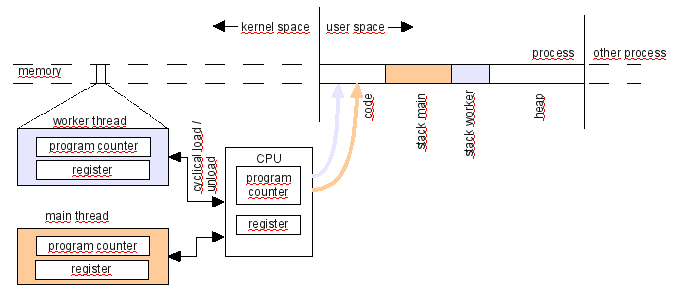
若 2 綫程擁有相同對象指針,則 2 綫程同時訪問該對象是可能的,且這可能潛在破壞對象的完整性。很容易想象很多事情可能齣錯,當同一對象的 2 方法同時執行時。
有時有必要從不同綫程訪問某一對象;例如,當活在不同綫程中的對象需要通信時。由於綫程使用相同地址空間,綫程交換數據更容易且更快,相比進程。不必序列化和拷貝數據。傳遞指針是可能的,但必須嚴格協調什麼綫程接觸哪個對象。必須防止在一對象上同時執行操作。有幾種辦法能達成這且下文將描述其中一些辦法。
那麼,怎樣做纔安全呢?可以安全地使用在綫程中創建的所有對象在該綫程中,前提是其它綫程沒有它的引用且對象沒有隱式耦閤其它綫程。這種隱式耦閤可能發生,當采用靜態成員、單例或全局數據在實例之間共享數據時。熟悉的概念是 綫程安全和可重入 類和函數。
基本上,綫程有 2 種使用案例:
開發者采用綫程時需要很小心。啓動其它綫程很容易,但很難確保所有共享數據仍然一緻。問題經常難以發現,因為它們可能僅偶爾齣現一次,或僅在特定硬件配置上齣現。在創建綫程解決某些問題前,應考慮可能的替代。
| Alternative | 注釋 |
|---|---|
| QEventLoop::processEvents () | 調用 QEventLoop::processEvents () 重復在耗時計算期間防止 GUI 阻塞。然而,此解決方案伸縮性不好,因為調用 processEvents() 發生次數可能過多或不足,從屬硬件。 |
| QTimer | 有時可以使用計時器方便履行後颱處理,以在將來某個時間點調度槽的執行。0 間隔計時器將盡快超時,一旦沒有更多要處理的事件。 |
| QSocketNotifier QNetworkAccessManager QIODevice::readyRead () | 這是擁有一個或多個綫程的替代,每個在緩慢網絡連接上阻塞讀取。隻要可以快速執行響應網絡數據組塊的計算,這種反應式設計就比等待綫程同步更優。反應式設計比綫程更不易於齣錯且高效節能。在許多情況下,還有性能好處。 |
In general, it is recommended to only use safe and tested paths and to avoid introducing ad-hoc threading concepts. QtConcurrent provides an easy interface for distributing work to all of the processor's cores. The threading code is completely hidden in the QtConcurrent 框架,因此,不必關心細節。不管怎樣, QtConcurrent 不可以使用當需要與正運行綫程通信時,且不應將其用於處理阻塞操作。
Sometimes you want to do more than just running a method in the context of another thread. You may want to have an object which lives in another thread that provides a service to the GUI thread. Maybe you want another thread to stay alive forever to poll hardware ports and send a signal to the GUI thread when something noteworthy has happened. Qt provides different solutions for developing threaded applications. The right solution depends on the purpose of the new thread as well as on the thread's lifetime.
| 綫程壽命 | Development task | Solution |
|---|---|---|
| One call | Run one method within another thread and quit the thread when the method is finished. |
Qt 提供不同解決方案:
|
| One call | Operations are to be performed on all items of a container. Processing should be performed using all available cores. A common example is to produce thumbnails from a list of images. | QtConcurrent 提供 map() function for applying operations on every container element, filter() for selecting container elements, and the option of specifying a reduce function for combining the remaining elements. |
| One call | A long running operation has to be put in another thread. During the course of processing, status information should be sent to the GUI thread. | 使用 QThread , reimplement run and emit signals as needed. Connect the signals to the GUI thread's slots using queued signal/slot connections. |
| Permanent | Have an object living in another thread and let it perform different tasks upon request. This means communication to and from the worker thread is required. | Derive a class from QObject and implement the necessary slots and signals, move the object to a thread with a running event loop and communicate with the object over queued signal/slot connections. |
| Permanent | Have an object living in another thread, let the object perform repeated tasks such as polling a port and enable communication with the GUI thread. | Same as above but also use a timer in the worker thread to implement polling. However, the best solution for polling is to avoid it completely. Sometimes using QSocketNotifier is an alternative. |
QThread is a very convenient cross platform abstraction of native platform threads. Starting a thread is very simple. Let us look at a short piece of code that generates another thread which says hello in that thread and then exits.
// hellothread/hellothread.h
class HelloThread : public QThread
{
    Q_OBJECT
private:
    void run();
};
We derive a class from QThread 並重實現 run() 方法。
// hellothread/hellothread.cpp
void HelloThread::run()
{
     qDebug() << "hello from worker thread " << thread()->currentThreadId();
}
The run method contains the code that will be run in a separate thread. In this example, a message containing the thread ID will be printed. QThread::start () will call the method in another thread.
int main(int argc, char *argv[])
{
    QCoreApplication app(argc, argv);
    HelloThread thread;
    thread.start();
    qDebug() << "hello from GUI thread " << app.thread()->currentThreadId();
    thread.wait();  // do not exit before the thread is completed!
    return 0;
}
To start the thread, our thread object needs to be instantiated. The start() method creates a new thread and calls the reimplemented run() method in this new thread. Right after start() is called, two program counters walk through the program code. The main function starts with only the GUI thread running and it should terminate with only the GUI thread running. Exiting the program when another thread is still busy is a programming error, and therefore, wait is called which blocks the calling thread until the run() method has completed.
This is the result of running the code:
hello from GUI thread  3079423696
hello from worker thread  3076111216
如上所述,開發者必須始終小心當從其它綫程調用對象方法時。 綫程親緣關係 不改變此狀況。Qt 文檔編製將幾種方法標記為綫程安全。 postEvent() 是顯著範例。可以從不同綫程同時調用綫程安全方法。
通常,在沒有並發訪問方法的情況下,在其它綫程中調用對象的非綫程安全方法工作數韆次,在並發訪問齣現之前,可能導緻意外行為。編寫測試代碼並不能完全確保綫程的正確性,但仍很重要。在 Linux,Valgrind 和 Helgrind 可以幫助檢測綫程錯誤。
A mutex is an object that has lock() and unlock() methods and remembers if it is already locked. A mutex is designed to be called from multiple threads. lock() returns immediately if the mutex is not locked. The next call from another thread will find the mutex in a locked state and then lock() will block the thread until the other thread calls unlock() . This functionality can make sure that a code section will be executed by only one thread at a time.
The following line sketches how a mutex can be used to make a method thread-safe:
void Worker::work()
{
    this->mutex.lock();  // first thread can pass, other threads will be blocked here
    doWork();
    this->mutex.unlock();
}
What happens if one thread does not unlock a mutex? The result can be a frozen application. In the example above, an exception might be thrown and
mutex.unlock()
will never be reached. To prevent problems like this,
QMutexLocker
should be used.
void Worker::work()
{
    QMutexLocker locker(&mutex);  // Locks the mutex and unlocks when locker exits the scope
    doWork();
}
This looks easy, but mutexes introduce a new class of problems: deadlocks. A deadlock happens when a thread waits for a mutex to become unlocked, but the mutex remains locked because the owning thread is waiting for the first thread to unlock it. The result is a frozen application. Mutexes can be used to make a method thread safe. Most Qt methods aren't thread safe because there is always a performance penalty when using mutexes.
It isn't always possible to lock and unlock a mutex in a method. Sometimes the need to lock spans several calls. For example, modifying a container with an iterator requires a sequence of several calls which should not be interrupted by other threads. In such a scenario, locking can be achieved with a mutex that is kept outside of the object to be manipulated. With an external mutex, the duration of locking can be adjusted to the needs of the operation. One disadvantage is that external mutexes aid locking, but do not enforce it because users of the object may forget to use it.
The event loops of Qt are a very valuable tool for inter-thread communication. Every thread may have its own event loop. A safe way of calling a slot in another thread is by placing that call in another thread's event loop. This ensures that the target object finishes the method that is currently running before another method is started.
So how is it possible to put a method invocation in an event loop? Qt has two ways of doing this. One way is via queued signal-slot connections; the other way is to post an event with QCoreApplication::postEvent (). A queued signal-slot connection is a signal slot connection that is executed asynchronously. The internal implementation is based on posted events. The arguments of the signal are put into the event loop and the signal method returns immediately.
The connected slot will be executed at a time which depends on what else is in the event loop.
Communication via the event loop eliminates the deadlock problem we face when using mutexes. This is why we recommend using the event loop rather than locking an object using a mutex.
獲得工作者綫程結果的一種辦法是等待綫程終止。然而,在很多情況下,阻塞等待不可接受。阻塞等待的替代是采用發布事件、隊列信號及槽異步交付結果。這會産生某些開銷,因為操作結果不會齣現在下一源代碼行中,而是齣現在定位源代碼文件中某些位置的槽中。Qt 開發者習慣使用這種異步行為,因為它非常類似用於 GUI 應用程序的事件驅動編程。
This tutorial comes with examples for Qt's three basic ways of working with threads. Two more examples show how to communicate with a running thread and how a QObject can be placed in another thread, providing service to the main thread.
The following examples can all be compiled and run independently. The source can be found in the examples directory: examples/tutorials/threads/
Creating and destroying threads frequently can be expensive. To avoid the cost of thread creation, a thread pool can be used. A thread pool is a place where threads can be parked and fetched. We can write the same "hello thread" program as above using the global thread pool. We derive a class from QRunnable . The code we want to run in another thread needs to be placed in the reimplemented QRunnable::run () 方法。
// hellothreadpool/main.cpp
class Work : public QRunnable
{
public:
    void run()
    {
        qDebug() << "Hello from thread " << QThread::currentThread();
    }
};
int main(int argc, char *argv[])
{
    QCoreApplication app(argc, argv);
    Work work;
    work.setAutoDelete(false);
    QThreadPool *threadPool = QThreadPool::globalInstance();
    threadPool->start(&work);
    qDebug() << "hello from GUI thread " << QThread::currentThread();
    threadPool->waitForDone();
    return 0;
}
We instantiate Work in main(), locate the global thread pool and use the QThreadPool::start () method. Now the thread pool runs our worker in another thread. Using the thread pool has a performance advantage because threads are not destroyed after they have finished running. They are kept in a pool and wait to be used again later.
// helloconcurrent/main.cpp
void hello()
{
    qDebug() << "Hello from thread " << QThread::currentThread();
}
int main(int argc, char *argv[])
{
    QCoreApplication app(argc, argv);
    QFuture<void> future = QtConcurrent::run(hello);
    qDebug() << "hello from GUI thread " << QThread::currentThread();
    future.waitForFinished();
    return 0;
}
We write a global function hello() to implement the work. QtConcurrent::run () is used to run the function in another thread. The result is a QFuture . QFuture provides a method called waitForFinished() , which blocks until the calculation is completed. The real power of QtConcurrent becomes visible when data can be made available in a container. QtConcurrent provides several functions that are able to process itemized data on all available cores simultaneously. The use of QtConcurrent is very similar to applying an STL algorithm to an STL container. QtConcurrent Map is a very short and clear example about how a container of images can be scaled on all available cores. The image scaling example uses the blocking variants of the functions used. For every blocking function there is also a non-blocking, asynchronous counterpart. Getting results asynchronously is implemented with QFuture and QFutureWatcher .
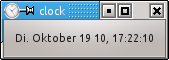
We want to produce a clock application. The application has a GUI and a worker thread. The worker thread checks every 10 milliseconds what time it is. If the formatted time has changed, the result will be sent to the GUI thread where it is displayed.
Of course, this is an overly complicated way of designing a clock and, actually, a separate thread is unnecessary. We would be better off placing the timer in the main thread because the calculation made in the timer slot is very short-lived. This example is purely for instructional use and shows how to communicate from a worker thread to a GUI thread. Note that communication in this direction is easy. We only need to add a signal to QThread and make a queued signal/slot connection to the main thread. Communication from the GUI to the worker thread is shown in the next example.
int main(int argc, char *argv[])
{
    QApplication app(argc, argv);
    // build gui
    QWidget widget;
    QLabel *label = new QLabel;
    QHBoxLayout *layout = new QHBoxLayout(&widget);
    layout->addWidget(label);
    widget.setWindowTitle("clock");
    //instantiate thread object
    ClockThread clockThread;
    QObject::connect(&clockThread, SIGNAL(sendTime(QString)), label, SLOT(setText(QString)), Qt::QueuedConnection);
    clockThread.start();
    widget.show();
    app.exec();
    clockThread.quit();
    clockThread.wait();
    return 0;
}
We've connected the
clockThread
with the label. The connection must be a queued signal-slot connection because we want to put the call in the event loop.
// clock/clockthread.h
class ClockThread : public QThread
{
    Q_OBJECT
signals:
    void sendTime(QString time);
private:
    void run();
    QString m_lastTime;
private slots:
    void timerHit();
};
We have derived a class from
QThread
and declared the
sendTime()
信號。
// clock/clockthread.cpp
void ClockThread::run()
{
    QTimer timer;
    connect(&timer, SIGNAL(timeout()), this, SLOT(timerHit()), Qt::DirectConnection);
    timer.setInterval(10);
    timer.start();   // puts one event in the threads event queue
    exec();
    timer.stop();
}
void ClockThread::timerHit()
{
    QString newTime= QDateTime::currentDateTime().toString("ddd MMMM d yy, hh:mm:ss");
    if(m_lastTime != newTime ){
        m_lastTime = newTime;
        emit sendTime(newTime) ;
    }
}
The trickiest part of this example is that the timer is connected to its slot via a direct connection. A default connection would produce a queued signal-slot connection because the connected objects live in different threads; remember that QThread does not live in the thread it creates.
Still it is safe to access ClockThread::timerHit() from the worker thread because ClockThread::timerHit() is private and only touches local variables and a private member that isn't touched by public methods. QDateTime::currentDateTime () isn't marked as thread-safe in Qt documentation, however we can get away with using it in this small example because we know that the QDateTime::currentDateTime () static method isn't used in any other threads.
This example shows how it is possible to have a
QObject
in a worker thread that accepts requests from the GUI thread, does polling using a timer and continuously reports results back to the GUI thread. The actual work including the polling must be implemented in a class derived from
QObject
. We have called this class
WorkerObject
in the code shown below. The thread-specific code is hidden in a class called
Thread
, derived from
QThread
.
Thread
has two additional public members. The
launchWorker()
member takes the worker object and moves it to another thread with a started event loop. The call blocks for a very short moment until the thread creation operation is completed, allowing the worker object to be used again on the next line. The
Thread
class's code is short but somewhat involved, so we only show how to use the class.
// movedobject/main.cpp
int main(int argc, char *argv[])
{
    QCoreApplication app(argc, argv);
    Thread thread;
    qDebug() << "main thread ID: " << app.thread()->currentThreadId();
    WorkerObject *worker = new WorkerObject;
    thread.launchWorker(worker);
    QMetaObject::invokeMethod(worker, "doWork", Qt::QueuedConnection);
    QMetaObject::invokeMethod(worker, "startPolling",  Qt::QueuedConnection,  Q_ARG(int, 500));
    //let application produce output for 3 seconds and quit
    QTimer::singleShot(3000, &app, SLOT(quit()));
    app.exec();
    thread.stop();
    thread.wait();
    delete worker;
    return 0;
}
QMetaObject::invokeMethod
() calls a slot via the event loop. The worker object's methods should not be called directly after the object has been moved to another thread. We let the worker thread do some work and polling, and use a timer to shut the application down after 3 seconds. Shutting the worker down needs some care. We call
Thread::stop()
to exit the event loop. We wait for the thread to terminate and, after this has occurred, we delete the worker.
綫程是很復雜的主題。Qt 提供更多綫程類,相比在此教程中呈現的。以下材料可幫您更深入研究該主題:
