The Q3ProgressDialog class provides feedback on the progress of a slow operation. 更多...
| 頭: | #include <Q3ProgressDialog> |
| 繼承: | QDialog |
|
|
| Q3ProgressDialog (QWidget * creator , const char * name , bool modal = false, Qt::WindowFlags f = 0) | |
| Q3ProgressDialog (const QString & labelText , const QString & cancelButtonText , int totalSteps , QWidget * creator = 0, const char * name = 0, bool modal = false, Qt::WindowFlags f = 0) | |
| Q3ProgressDialog (QWidget * creator = 0, Qt::WindowFlags f = 0) | |
| Q3ProgressDialog (const QString & labelText , const QString & cancelButtonText , int totalSteps , QWidget * creator = 0, Qt::WindowFlags f = 0) | |
| ~Q3ProgressDialog () | |
| bool | autoClose () const |
| bool | autoReset () const |
| QString | labelText () const |
| int | minimumDuration () const |
| int | progress () const |
| void | setAutoClose (bool b ) |
| void | setAutoReset (bool b ) |
| void | setBar (Q3ProgressBar * bar ) |
| void | setCancelButton (QPushButton * cancelButton ) |
| void | setLabel (QLabel * label ) |
| int | totalSteps () const |
| bool | wasCanceled () const |
| bool | wasCancelled () const |
| virtual QSize | sizeHint () const |
| void | cancel () |
| void | reset () |
| void | setCancelButtonText (const QString & cancelButtonText ) |
| void | setLabelText (const QString &) |
| void | setMinimumDuration (int ms ) |
| void | setProgress (int progress ) |
| void | setProgress (int progress , int totalSteps ) |
| void | setTotalSteps (int totalSteps ) |
| void | canceled () |
| void | cancelled () |
| virtual void | changeEvent (QEvent * ev ) |
| virtual void | closeEvent (QCloseEvent * e ) |
| virtual void | resizeEvent (QResizeEvent *) |
| virtual void | showEvent (QShowEvent * e ) |
| void | forceShow () |
The Q3ProgressDialog class provides feedback on the progress of a slow operation.
進度對話框用於給予用戶操作將花費多長時間的指示,並演示應用程序末被凍結。它還可以讓用戶,有機會中止操作。
A common problem with progress dialogs is that it is difficult to know when to use them; operations take different amounts of time on different hardware. Q3ProgressDialog offers a solution to this problem: it estimates the time the operation will take (based on time for steps), and only shows itself if that estimate is beyond minimumDuration () (默認 4 秒)。
使用 setTotalSteps () (or the constructor) to set the number of "steps" in the operation and call setProgress () as the operation progresses. The step value can be chosen arbitrarily. It can be the number of files copied, the number of bytes received, the number of iterations through the main loop of your algorithm, or some other suitable unit. Progress starts at 0, and the progress dialog shows that the operation has finished when you call setProgress () 采用 totalSteps () 作為其自變量。
對話框在操作結束時自動重置並隱藏本身。使用 setAutoReset () 和 setAutoClose () to change this behavior.
There are two ways of using Q3ProgressDialog : modal and modeless.
Using a modal Q3ProgressDialog is simpler for the programmer, but you must call QApplication::processEvents () 或 QEventLoop::processEvents (ExcludeUserInput) to keep the event loop running to ensure that the application doesn't freeze. Do the operation in a loop, call setProgress () 不時,並校驗是否取消采用 wasCanceled ()。例如:
Q3ProgressDialog progress("Copying files...", "Abort Copy", numFiles,
                          this, "progress", true);
for (int i = 0; i < numFiles; i++) {
    progress.setProgress(i);
    qApp->processEvents();
    if (progress.wasCanceled())
        break;
    //... copy one file
}
progress.setProgress(numFiles);
A modeless progress dialog is suitable for operations that take place in the background, where the user is able to interact with the application. Such operations are typically based on QTimer (或 QObject::timerEvent ()), QSocketNotifier ,或 QUrlOperator ;或在單獨綫程中履行。 Q3ProgressBar 在主窗口狀態欄中,經常是非模態進度對話框的替代。
需要以事件循環來運行,連接 canceled () 信號到操作停止槽,和調用 setProgress () 不時。例如:
Operation::Operation(QObject *parent = 0)
    : QObject(parent), steps(0)
{
    pd = new Q3ProgressDialog("Operation in progress.", "Cancel", 100);
    connect(pd, SIGNAL(canceled()), this, SLOT(cancel()));
    t = new QTimer(this);
    connect(t, SIGNAL(timeout()), this, SLOT(perform()));
    t->start(0);
}
void Operation::perform()
{
    pd->setProgress(steps);
    //... perform one percent of the operation
    steps++;
    if (steps > pd->totalSteps())
        t->stop();
}
void Operation::cancel()
{
    t->stop();
    //... cleanup
}
這 2 種模式,都可以通過采用自定義小部件替換子級 Widget 以定製進度對話框,通過使用 setLabel (), setBar (),和 setCancelButton ()。函數 setLabelText () 和 setCancelButtonText () 設置展示文本。
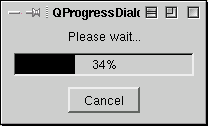
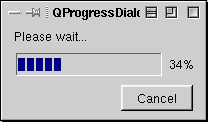
另請參閱 QDialog , Q3ProgressBar ,和 GUI 設計手冊:進度指示器 .
This property holds whether the dialog gets hidden by reset().
默認為 true。
訪問函數:
| bool | autoClose () const |
| void | setAutoClose (bool b ) |
另請參閱 setAutoReset ().
This property holds whether the progress dialog calls reset() as soon as progress() equals totalSteps().
默認為 true。
訪問函數:
| bool | autoReset () const |
| void | setAutoReset (bool b ) |
另請參閱 setAutoClose ().
This property holds the label's text.
默認文本為空字符串。
訪問函數:
| QString | labelText () const |
| void | setLabelText (const QString &) |
This property holds the time that must pass before the dialog appears.
If the expected duration of the task is less than the minimumDuration, the dialog will not appear at all. This prevents the dialog popping up for tasks that are quickly over. For tasks that are expected to exceed the minimumDuration, the dialog will pop up after the minimumDuration time or as soon as any progress is set.
若設為 0,始終一設置任何進度,就會盡快展示對話框。默認為 4000 毫秒。
訪問函數:
| int | minimumDuration () const |
| void | setMinimumDuration (int ms ) |
此特性保持當前已取得的進度數量。
For the progress dialog to work as expected, you should initially set this property to 0 and finally set it to Q3ProgressDialog::totalSteps (); you can call setProgress() any number of times in-between.
警告: 若進度對話框是模態的 (見 Q3ProgressDialog::Q3ProgressDialog ()), this function calls QApplication::processEvents (), so take care that this does not cause undesirable re-entrancy in your code. For example, don't use a Q3ProgressDialog 在 paintEvent ()!
訪問函數:
| int | progress () const |
| void | setProgress (int progress ) |
| void | setProgress (int progress , int totalSteps ) |
另請參閱 totalSteps .
This property holds the total number of steps.
默認為 0。
訪問函數:
| int | totalSteps () const |
| void | setTotalSteps (int totalSteps ) |
This property holds whether the dialog was canceled.
訪問函數:
| bool | wasCanceled () const |
另請參閱 setProgress ().
This property holds whether the dialog was canceled.
使用 wasCanceled 代替。
該特性在 Qt 4.2 引入。
訪問函數:
| bool | wasCancelled () const |
構造進度對話框。
默認設置:
The creator argument is the widget to use as the dialog's parent. The name , modal , and the widget flags, f , are passed to the QDialog::QDialog () constructor. If modal is false (the default), you must have an event loop proceeding for any redrawing of the dialog to occur. If modal is true, the dialog ensures that events are processed when needed.
另請參閱 setLabelText (), setLabel (), setCancelButtonText (), setCancelButton (),和 setTotalSteps ().
構造進度對話框。
The labelText is text used to remind the user what is progressing.
The cancelButtonText is the text to display on the cancel button, or 0 if no cancel button is to be shown.
The totalSteps is the total number of steps in the operation for which this progress dialog shows progress. For example, if the operation is to examine 50 files, this value would be 50. Before examining the first file, call setProgress (0). As each file is processed call setProgress (1), setProgress (2), etc., finally calling setProgress (50) after examining the last file.
The creator argument is the widget to use as the dialog's parent. The name , modal , and widget flags, f , are passed to the QDialog::QDialog () constructor. If modal is false (the default), you will must have an event loop proceeding for any redrawing of the dialog to occur. If modal is true, the dialog ensures that events are processed when needed.
另請參閱 setLabelText (), setLabel (), setCancelButtonText (), setCancelButton (),和 setTotalSteps ().
構造進度對話框。
默認設置:
The creator argument is the widget to use as the dialog's parent. The widget flags, f , are passed to the QDialog::QDialog () 構造函數。
另請參閱 setLabelText (), setLabel (), setCancelButtonText (), setCancelButton (),和 setTotalSteps ().
構造進度對話框。
The labelText is text used to remind the user what is progressing.
The cancelButtonText is the text to display on the cancel button, or 0 if no cancel button is to be shown.
The totalSteps is the total number of steps in the operation for which this progress dialog shows progress. For example, if the operation is to examine 50 files, this value would be 50. Before examining the first file, call setProgress (0). As each file is processed call setProgress (1), setProgress (2), etc., finally calling setProgress (50) after examining the last file.
The creator argument is the widget to use as the dialog's parent. The widget flags, f , are passed to the QDialog::QDialog () 構造函數。
另請參閱 setLabelText (), setLabel (), setCancelButtonText (), setCancelButton (),和 setTotalSteps ().
銷毀進度對話框。
[slot]
void
Q3ProgressDialog::
cancel
()
重置進度對話框。 wasCanceled () 變為 true,直到進度對話框被重置。進度對話框變為隱藏。
[signal]
void
Q3ProgressDialog::
canceled
()
此信號發射,當點擊取消按鈕時。它被連接到 cancel () 槽,默認情況下。
另請參閱 wasCanceled ().
[signal]
void
Q3ProgressDialog::
cancelled
()
使用 canceled () 代替。
[virtual protected]
void
Q3ProgressDialog::
changeEvent
(
QEvent
*
ev
)
重實現自 QWidget::changeEvent ().
[virtual protected]
void
Q3ProgressDialog::
closeEvent
(
QCloseEvent
*
e
)
重實現自 QWidget::closeEvent ().
[protected slot]
void
Q3ProgressDialog::
forceShow
()
展示,若算法啓動後對話框仍隱藏且 minimumDuration 毫秒已過去。
另請參閱 setMinimumDuration ().
[slot]
void
Q3ProgressDialog::
reset
()
重置進度對話框。進度對話框變為隱藏,若 autoClose () 為 true。
另請參閱 setAutoClose () 和 setAutoReset ().
[virtual protected]
void
Q3ProgressDialog::
resizeEvent
(
QResizeEvent
*)
重實現自 QWidget::resizeEvent ().
將進度欄小部件設為 bar 。進度對話框會重置大小以擬閤。進度對話框擁有其所有權對於進度 bar 會被刪除當有必要時,因此不要使用分配在堆棧中的進度條。
將取消按鈕設為 Push Button (按鈕) cancelButton . The progress dialog takes ownership of this button which will be deleted when necessary, so do not pass the address of an object that is on the stack, i.e. use new() to create the button.
另請參閱 setCancelButtonText ().
[slot]
void
Q3ProgressDialog::
setCancelButtonText
(const
QString
&
cancelButtonText
)
將取消按鈕的文本設為 cancelButtonText .
另請參閱 setCancelButton ().
把標簽設為 label 。進度對話框會重置大小以擬閤。標簽變為由進度對話框所有,且會被刪除當有必要時,因此,不要把對象地址傳遞給堆棧。
另請參閱 setLabelText ().
[virtual protected]
void
Q3ProgressDialog::
showEvent
(
QShowEvent
*
e
)
重實現自 QWidget::showEvent ().
[虛擬]
QSize
Q3ProgressDialog::
sizeHint
() const
重實現自 QWidget::sizeHint ().
Returns a size that fits the contents of the progress dialog. The progress dialog resizes itself as required, so you should not need to call this yourself.
