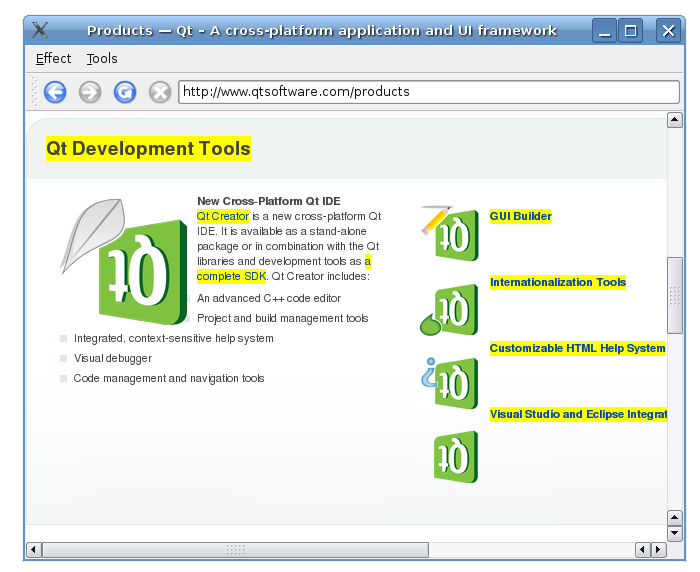
The application makes use of QWebFrame::evaluateJavaScript to evaluate the jQuery JavaScript code. A QMainWindow 采用 QWebView as central widget builds up the browser itself.
The
MainWindow
類繼承
QMainWindow
. It implements a number of slots to perform actions on both the application and on the web content.
class MainWindow : public QMainWindow
{
    Q_OBJECT
public:
    MainWindow(const QUrl& url);
protected slots:
    void adjustLocation();
    void changeLocation();
    void adjustTitle();
    void setProgress(int p);
    void finishLoading(bool);
    void viewSource();
    void slotSourceDownloaded();
    void highlightAllLinks();
    void rotateImages(bool invert);
    void removeGifImages();
    void removeInlineFrames();
    void removeObjectElements();
    void removeEmbeddedElements();
private:
    QString jQuery;
    QWebView *view;
    QLineEdit *locationEdit;
    QAction *rotateAction;
    int progress;
還聲明 QString that contains the jQuery, a QWebView 顯示 Web 內容,和 QLineEdit 充當地址欄。
We start by implementing the constructor.
MainWindow::MainWindow(const QUrl& url)
{
    progress = 0;
    QFile file;
    file.setFileName(":/jquery.min.js");
    file.open(QIODevice::ReadOnly);
    jQuery = file.readAll();
    file.close();
The first part of the constructor sets the value of
progress
to 0. This value will be used later in the code to visualize the loading of a webpage.
Next, the jQuery library is loaded using a QFile and reading the file content. The jQuery library is a JavaScript library that provides different functions for manipulating HTML.
    view = new QWebView(this);
    view->load(url);
    connect(view, SIGNAL(loadFinished(bool)), SLOT(adjustLocation()));
    connect(view, SIGNAL(titleChanged(QString)), SLOT(adjustTitle()));
    connect(view, SIGNAL(loadProgress(int)), SLOT(setProgress(int)));
    connect(view, SIGNAL(loadFinished(bool)), SLOT(finishLoading(bool)));
    locationEdit = new QLineEdit(this);
    locationEdit->setSizePolicy(QSizePolicy::Expanding, locationEdit->sizePolicy().verticalPolicy());
    connect(locationEdit, SIGNAL(returnPressed()), SLOT(changeLocation()));
    QToolBar *toolBar = addToolBar(tr("Navigation"));
    toolBar->addAction(view->pageAction(QWebPage::Back));
    toolBar->addAction(view->pageAction(QWebPage::Forward));
    toolBar->addAction(view->pageAction(QWebPage::Reload));
    toolBar->addAction(view->pageAction(QWebPage::Stop));
    toolBar->addWidget(locationEdit);
構造函數的第二部分是創建 QWebView and connects slots to the views signals. Furthermore, we create a QLineEdit as the browsers address bar. We then set the horizontal QSizePolicy 以隨時填充瀏覽器可用區域。添加 QLineEdit 到 QToolbar 及一組導航動作來自 QWebView::pageAction .
    QMenu *effectMenu = menuBar()->addMenu(tr("&Effect"));
    effectMenu->addAction("Highlight all links", this, SLOT(highlightAllLinks()));
    rotateAction = new QAction(this);
    rotateAction->setIcon(style()->standardIcon(QStyle::SP_FileDialogDetailedView));
    rotateAction->setCheckable(true);
    rotateAction->setText(tr("Turn images upside down"));
    connect(rotateAction, SIGNAL(toggled(bool)), this, SLOT(rotateImages(bool)));
    effectMenu->addAction(rotateAction);
    QMenu *toolsMenu = menuBar()->addMenu(tr("&Tools"));
    toolsMenu->addAction(tr("Remove GIF images"), this, SLOT(removeGifImages()));
    toolsMenu->addAction(tr("Remove all inline frames"), this, SLOT(removeInlineFrames()));
    toolsMenu->addAction(tr("Remove all object elements"), this, SLOT(removeObjectElements()));
    toolsMenu->addAction(tr("Remove all embedded elements"), this, SLOT(removeEmbeddedElements()));
    setCentralWidget(view);
    setUnifiedTitleAndToolBarOnMac(true);
}
The third and last part of the constructor implements two QMenus and assigns a set of actions to them. The last line sets the QWebView 作為中心 Widget 在 QMainWindow .
void MainWindow::adjustLocation()
{
    locationEdit->setText(view->url().toString());
}
void MainWindow::changeLocation()
{
    QUrl url = QUrl(locationEdit->text());
    view->load(url);
    view->setFocus();
}
當加載頁麵時,
adjustLocation()
updates the address bar;
adjustLocation()
被觸發通過
loadFinished()
信號在
QWebView
。在
changeLocation()
we create a
QUrl
對象,然後使用它把頁麵加載到
QWebView
。當新網頁加載完成時,
adjustLocation()
will be run once more to update the address bar.
void MainWindow::adjustTitle()
{
    if (progress <= 0 || progress >= 100)
        setWindowTitle(view->title());
    else
        setWindowTitle(QString("%1 (%2%)").arg(view->title()).arg(progress));
}
void MainWindow::setProgress(int p)
{
    progress = p;
    adjustTitle();
}
adjustTitle()
sets the window title and displays the loading progress. This slot is triggered by the
titleChanged()
信號在
QWebView
.
void MainWindow::finishLoading(bool)
{
    progress = 100;
    adjustTitle();
    view->page()->mainFrame()->evaluateJavaScript(jQuery);
    rotateImages(rotateAction->isChecked());
}
When a web page has loaded,
finishLoading()
被觸發通過
loadFinished()
信號在
QWebView
.
finishLoading()
then updates the progress in the title bar and calls
evaluateJavaScript()
to evaluate the jQuery library. This evaluates the JavaScript against the current web page. What that means is that the JavaScript can be viewed as part of the content loaded into the
QWebView
,因此每當加載新頁麵時,都需要加載。一旦加載 jQuery 庫,就可以開始在瀏覽器中執行不同 jQuery 函數。
The rotateImages() function is then called explicitely to make sure that the images of the newly loaded page respect the state of the toggle action.
void MainWindow::highlightAllLinks()
{
    QString code = "$('a').each( function () { $(this).css('background-color', 'yellow') } )";
    view->page()->mainFrame()->evaluateJavaScript(code);
}
首個基於 jQuery 的函數
highlightAllLinks()
,旨在用來突齣顯示當前網頁中的所有鏈接。JavaScript 代碼查找 Web 元素名為
a
, which is the tag for a hyperlink. For each such element, the background color is set to be yellow by using CSS.
void MainWindow::rotateImages(bool invert)
{
    QString code;
    if (invert)
        code = "$('img').each( function () { $(this).css('-webkit-transition', '-webkit-transform 2s'); $(this).css('-webkit-transform', 'rotate(180deg)') } )";
    else
        code = "$('img').each( function () { $(this).css('-webkit-transition', '-webkit-transform 2s'); $(this).css('-webkit-transform', 'rotate(0deg)') } )";
    view->page()->mainFrame()->evaluateJavaScript(code);
}
The
rotateImages()
function rotates the images on the current web page. Webkit supports CSS transforms and this JavaScript code looks up all
img
elements and rotates the images 180 degrees and then back again.
void MainWindow::removeGifImages()
{
    QString code = "$('[src*=gif]').remove()";
    view->page()->mainFrame()->evaluateJavaScript(code);
}
void MainWindow::removeInlineFrames()
{
    QString code = "$('iframe').remove()";
    view->page()->mainFrame()->evaluateJavaScript(code);
}
void MainWindow::removeObjectElements()
{
    QString code = "$('object').remove()";
    view->page()->mainFrame()->evaluateJavaScript(code);
}
void MainWindow::removeEmbeddedElements()
{
    QString code = "$('embed').remove()";
    view->page()->mainFrame()->evaluateJavaScript(code);
}
The remaining four methods remove different elements from the current web page.
removeGifImages()
移除頁麵中的所有 GIF 圖像通過查找
src
屬性 (為網頁中的所有元素)。任何元素采用
gif
file as its source is removed.
removeInlineFrames()
removes all
iframe
or inline elements.
removeObjectElements()
removes all
object
elements, and
removeEmbeddedElements()
removes any elements such as plugins embedded on the page using the
embed
標簽。
文件:
